Microsoft 70-412 - Questions & Answers
Free preview · every answer includes a full explanation
Product page: https://prepkeys.com/70-412.html
You are employed as a senior network administrator at ABC.com.
ABC.com has an Active Directory domain named ABC.com.
All servers on the ABC.com network have Windows Server 2012 R2 installed.
The ABC.com domain has an Active Directory site configured in London, and an Active Directory site in
New York.
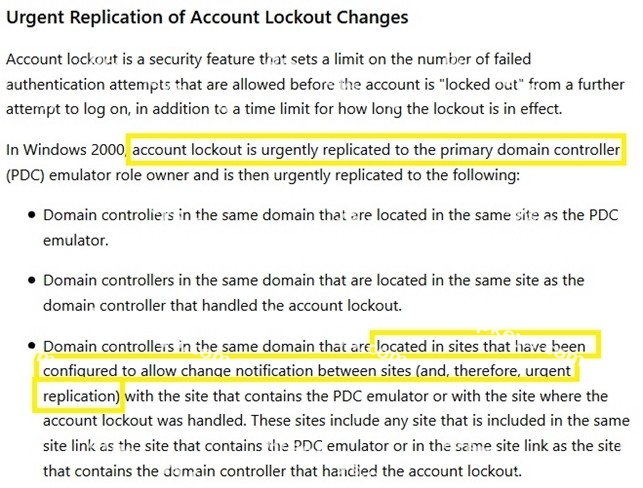
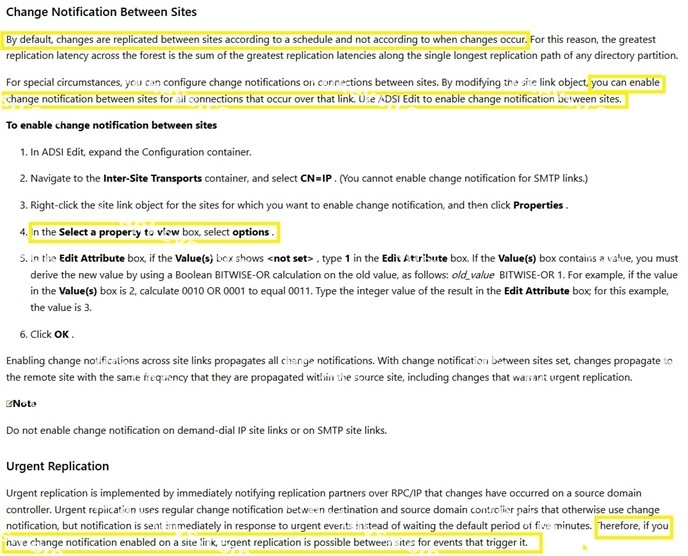
You have been instructed to make sure that the synchronization of account lockout data happens quicker.
You are employed as a senior network administrator at ABC.com.
ABC.com has an Active Directory domain named ABC.com.
All servers on the ABC.com network have Windows Server 2012 R2 installed.
ABC.com has two servers, named SERVER1 and SERVER2 which are configured in a two-node failover cluster. Server1 includes a folder, named ABCAppData, which is configured as a Distributed File System (DFS) name space folder target. After configuring another two nodes in the failover cluster, you are instructed to make sure that access to ABC AppData is highly available.
You also have to make sure that application data is replicated to ABCAppData via DFS replication.
Which following actions should you take?
Your network contains an Active Directory forest named contoso.com.
The forest contains a single domain. The domain contains three domain controllers.
The domain controllers are configured as shown in the following table.
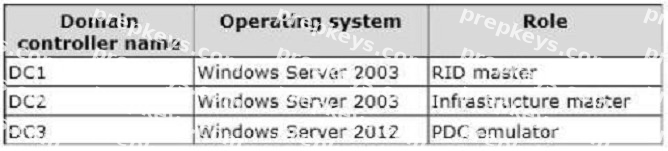
You discover that when you run Group Policy Results from Group Policy Management, the settings from site-linked Group Policy objects (GPOs) fail to appear in the results.
You need to ensure that the settings from site-linked GPOs appear in the results.
What should you do first?
Your network contains an Active Directory domain named contoso.com. The domain contains a server named Server1 that runs Windows Server 2012 R2 and has the DNS Server server role installed.
Server1 is configured to use a DNS server from an Internet Service Provider (ISP) as a forwarder.
Corporate management requires that client computers only resolve names of contoso.com computers.
You need to configure Server1 to resolve names in the contoso.com zone only.
What should you do on Server1?
You have DHCP server named Server1 that runs Windows Server 2012 R2.
Server1 has two scopes named Production and Development.
Currently, all DHCP clients register their host name in a DNS zone named contoso.com.
You need to ensure that only the clients that obtain an IP address from the development scope, register their host name in a DNS zone named dev.contoso.com.
What should you do?
Your network contains an Active Directory domain named contoso.com.
All domain controllers run Windows Server 2012 R2. The domain contains two domain controllers.
The domain controllers are configured as shown in the following table.

The Branch site contains a member server named Server1 that runs Windows Server 2012 R2.
You need to identify which domain controller authenticated the computer account of Server1.
What should you do?
Your network contains an Active Directory domain named contoso.com. All domain controllers run Windows Server 2012 R2. The domain contains two domain controllers.
The domain controllers are configured as shown in the following table.

The Branch site contains a perimeter network.
For security reasons, client computers in the perimeter network can communicate with client computers in the Branch site only.
You plan to deploy a new RODC to the perimeter network in the Branch site.
You need to ensure that the new RODC will be able to replicate from DC10.
What should you do first on DC10?
You perform a full installation of Windows Server 2012 R2 on a virtual machine named Server1.
You plan to use Server1 as a reference image.
You need to minimize the amount of storage space used by the Windows Server 2012 R2 installation.
Which cmdlet should you use?
Your network contains an Active Directory domain named contoso.com.
The domain contains a server named Server1 that runs Windows Server 2012 R2 and has the DHCP Server server role installed.
Server1 has a scope named Scope1. A policy named Policy1 is configured for Scope1.
Policy1 is configured to provide Hyper-V virtual machines a one-day lease.
All other computers receive an eight-day lease.
You implement an additional DHCP server named Server2 that runs Windows Server 2012 R2.
On Server1, you configure Scopel for DHCP failover.
You discover that virtual machines that receive IP addresses from Server2 have a lease duration of eight days.
You need to ensure that when Server2 assigns IP addresses to the Hyper-V virtual machines, the lease duration is one day. The solution must ensure that other computers that receive IP addresses from Server2 have a lease duration of eight days.
What should you do?
Your network contains an Active Directory domain named contoso.com.
All servers run Windows Server 2012 R2. The domain contains a file server named Server1.
The domain contains a domain controller named DC1.
Server1 contains three shared folders.
The folders are configured as shown in the following table.
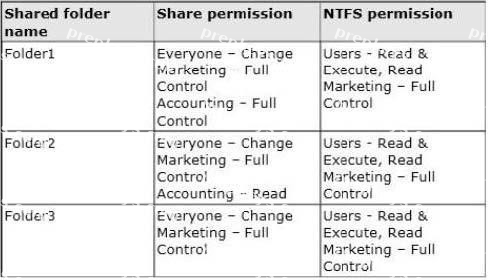
Folder2 has a conditional expression of User.Department= = MMarketing".
You discover that a user named User1 cannot access \\Server1\folder2.
User1 can access \\Server1\folderl and \\Server1\folder3.
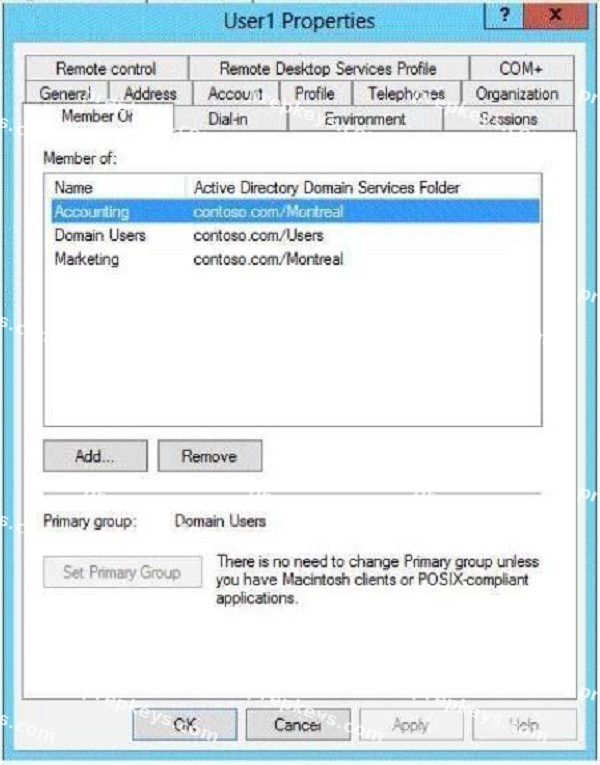
You verify the group membership of User1 as shown in the Member Of exhibit. (Click the Exhibit button.)
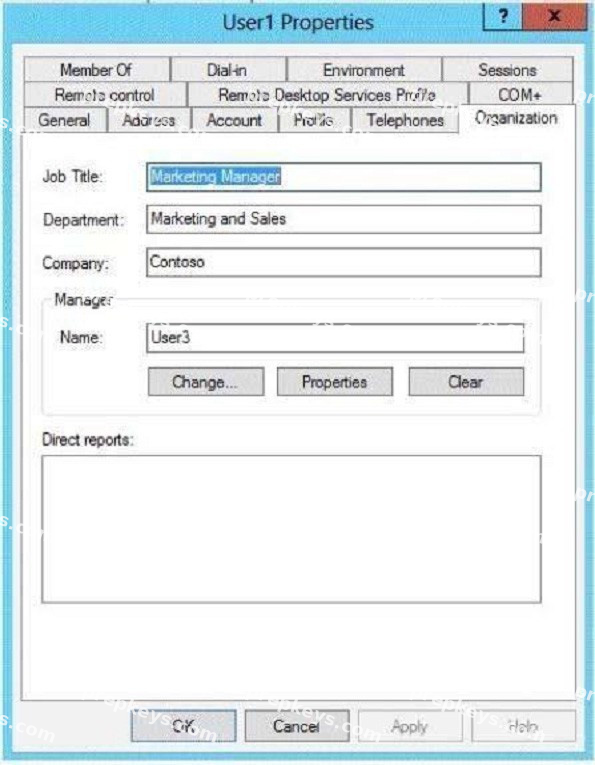
You verify the organization information of User1 as shown in the Organization exhibit. (Click the Exhibit button.)
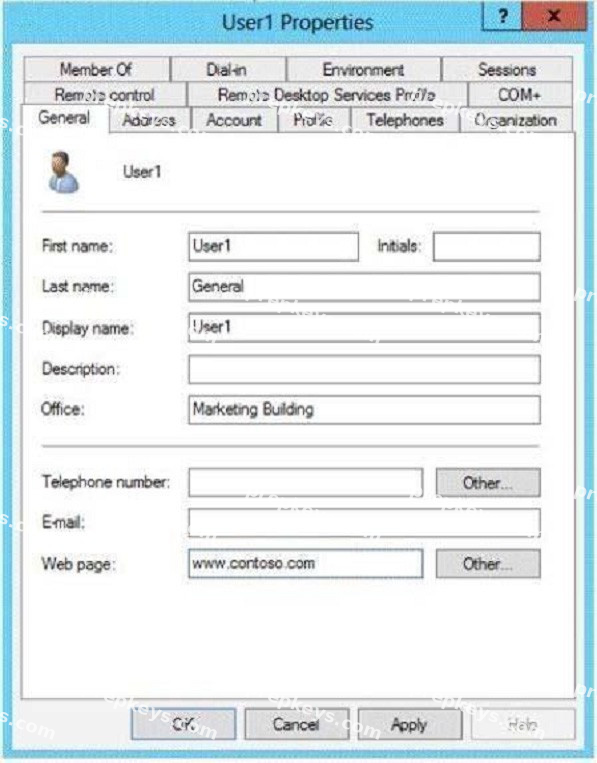
You verify the general properties of User1 as shown in the General exhibit. (Click the Exhibit button.)
You need to ensure that User1 can access the contents of \\Server1\folder2.
What should you do?