Exit demo 70-416 Implementing Desktop Application Environments PDF format · free preview

Microsoft 70-416 - Questions & Answers

Free preview · every answer includes a full explanation

Product page: https://prepkeys.com/70-416.html

Question 1
Single choice

You need to recommend a solution to update App4 on the client computers that already have the application deployed. The solution must meet the application requirements.

What should you include in the recommendation?

A.

Add a package to the software installation settings of a Group Policy object (GPO).

B.

Use Import Updates from the Update Services console.

C.

Run wsusutil.exe and specify the import parameter.

D.

Run a script that uses the WSUS Application Programming Interface (API) for local publishing.

Question 2
Single choice

You need to configure security for the HR users to meet the application requirements

What should you configure in Group Policy Management Editor?

A.

Security Options

B.

Restricted Groups

C.

Public Key Policies

D.

Application Control Policies

Question 3
Single choice

You need to configure the virtualized applications to ensure that they download fully before they can run on the client computers.

What should you use?

A.

Microsoft System Center 2012 App Controller

B.

The App-V Sequencer

C.

Microsoft System Center 2012 Virtual Machine Manager (VMM)

D.

The Application Virtualization Management Console

Question 4
Single choice

You need to recommend a solution to deploy App1. The solution must meet the application requirements.

What should you include in the recommendation?

A.

Create an .rdp file for App1, and then copy the file to the client computers by using a logon script.

B.

Configure the software installation settings in a Group Policy object (GPO).

C.

Configure the RemoteApp and Desktop Connections setting in a Group Policy object (GPO).

D.

Create an .rdp file for App1, and then copy the file to the client computers by using a startup script.

Question 5
Single choice

You need to meet the application requirements for administering the App-V infrastructure.

What should you install on Server1?

A.

The Microsoft Visual C++ 2010 Redistributable Package

B.

Microsoft SQL Server Native Client

C.

Microsoft .NET Framework 4.5

D.

Microsoft Silver light

Question 6
Drag & drop

DRAG DROP

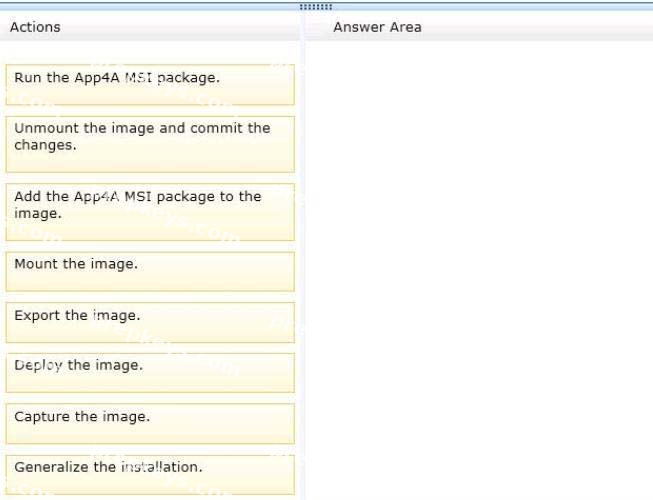
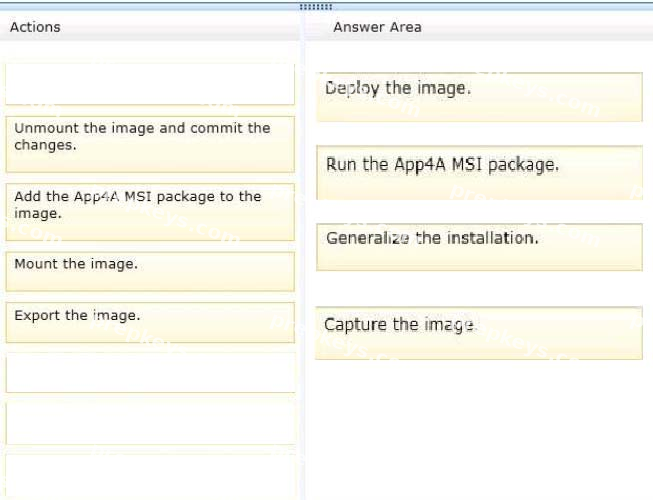
You need to update App4 in the standard desktop image. The solution must meet the technical requirements and the application requirements.

Which four actions should you perform?

To answer, move the four appropriate actions from the list of actions to the answer area and arrange them in the correct order.
Question 7
Single choice

You need to implement an RDS infrastructure to meet the technical requirements.

What should you do first?

A.

Install Microsoft SQL Server 2008 R2.

B.

Install the Failover Clustering feature.

C.

Install the Windows Internal Database feature.

D.

Install the Network Load Balancing (NLB) feature.

Question 8
Single choice

You need to recommend a solution to deliver the virtualized applications to the client computers.
The solution must meet the application requirements.

What should you include in the recommendation?

A.

Enhanced Storage

B.

BranchCache

C.

File Replication Service (FRS)

D.

Distributed File System (DFS)

Question 9
Single choice

You virtualize App5 and App6.

You need to ensure that App5 and App6 meet the application requirements.

What should you do?

A.

From the Application Virtualization Management Console, add a connection group.

B.

From the Application Virtualization Management Console, upgrade the packages.

C.

From the Microsoft Application Virtualization Sequencer, modify the Properties settings of App5 and App6.

D.

From the Microsoft Application Virtualization Sequencer, modify the Deployment settings of App5 and App6.

Question 10
Single choice

You need to secure the RD Web Access servers. The solution must meet the technical requirements.

What should you do?

A.

From Server Manager, edit the deployment properties.

B.

From the Certificates console, import the custom certificate to the personal certificates store of the local computer.

C.

From Server Manager, edit the collection properties.

D.

From the Certificates console, import the custom certificate to the Remote Desktop certificates store of the local computer.

Showing 10 of 84 questions · Unlock the full set