Exit demo 70-467 Designing Business Intelligence Solutions with Microsoft SQL Server 2012 PDF format · free preview

Microsoft 70-467 - Questions & Answers

Free preview · every answer includes a full explanation

Product page: https://prepkeys.com/70-467.html

Question 1
Single choice

You need to fix the PowerPivot data refresh problem by using the least amount of administrative effort.

What should you do?

A.

Use the PowerPivot Configuration Tool and select the Upgrade Features, Services, Applications and Solutions option.

B.

Use the PowerPivot Configuration Tool and select the Configure or Repair PowerPivot for SharePoint option.

C.

Reinstall SSAS in PowerPivot for SharePoint mode by using the SQL Server 2012 installation media.

D.

In SharePoint Central Administration, create a target application and configure the PowerPivot service application settings to use the target application.

Question 2
Single choice

You need to grant appropriate permissions to the SSISOwners SQL Server login.

What should you do?

A.

Map the login to the SSISDB database. Assign the user to the ssis_admin role.

B.

Map the login to the msdb database. Assign the user to the db_owner role.

C.

Map the login to the msdb database. Assign the user to the db_ssisadmin role.

D.

Map the login to the SSISDB database. Assign the user to the db_ssisadmin role.

E.

Map the login to the SSISDB database. Assign the user to the db_owner role.

F.

Map the login to the msdb database. Assign the user to the ssis_admin role.

Question 3
Multiple choice

You need to configure the Scenario attribute to ensure that business users appropriately query the Sales Plan measure.

What should you do(Each correct answer presents part of the solution. Choose all that apply.)

A.

Set the AttributeHierarchyVisible property to False.

B.

Set the IsAggregatable property to False.

C.

Set the Usage property to Parent.

D.

Set the DefaultMember property to the Forecast member.

E.

Set the AttributeHierarchyEnabled property to False.

F.

Set the RootMemberIf property to ParentIsMissing.

Question 4
Drag & drop

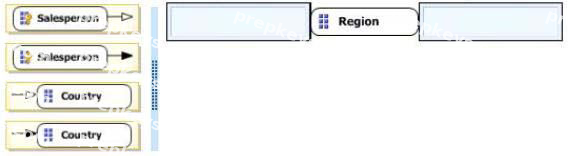
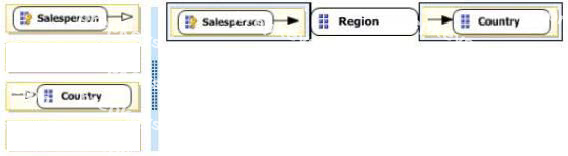
DRAG DROP

You need to configure the attribute relationship types for the Salesperson dimension.

Which configuration should you useTo answer, drag the appropriate pair of attributes and attribute relationships from the list to the correct location or locations in the answer area. (Answer choices may be used once, more than once, or not all.)
Question 5
Single choice

You need to define the trend calculation for the sales performance KPI.

Which KPI trend MDX expression should you use?

A.

CASE
WHEN [Sales Variance %] < ([Sales Variance %], [Date].[Calendar].PrevMember) THEN -1 WHEN
[Sales Variance %] = ([Sales Variance %], [Date].[Calendar].PrevMember) THEN 0 ELSE 1 END

B.

IIF([Sales Variance %3 < ([Sales Variance %], [Date].[Calendar].PrevMember), 1, 0)

C.

IIF([Sales Variance %] < ([Sales Variance %], [Date].[Calendar].PrevMember), 0, 1)

D.

CASE
WHEN [Sales Variance %] < ([Sales Variance %], [Date].[Calendar].PrevMember) THEN 1 WHEN
[Sales
Variance %] = ([Sales Variance %], [Date].[Calendar].PrevMember) THEN 0 ELSE -1
END

Question 6
Drag & drop

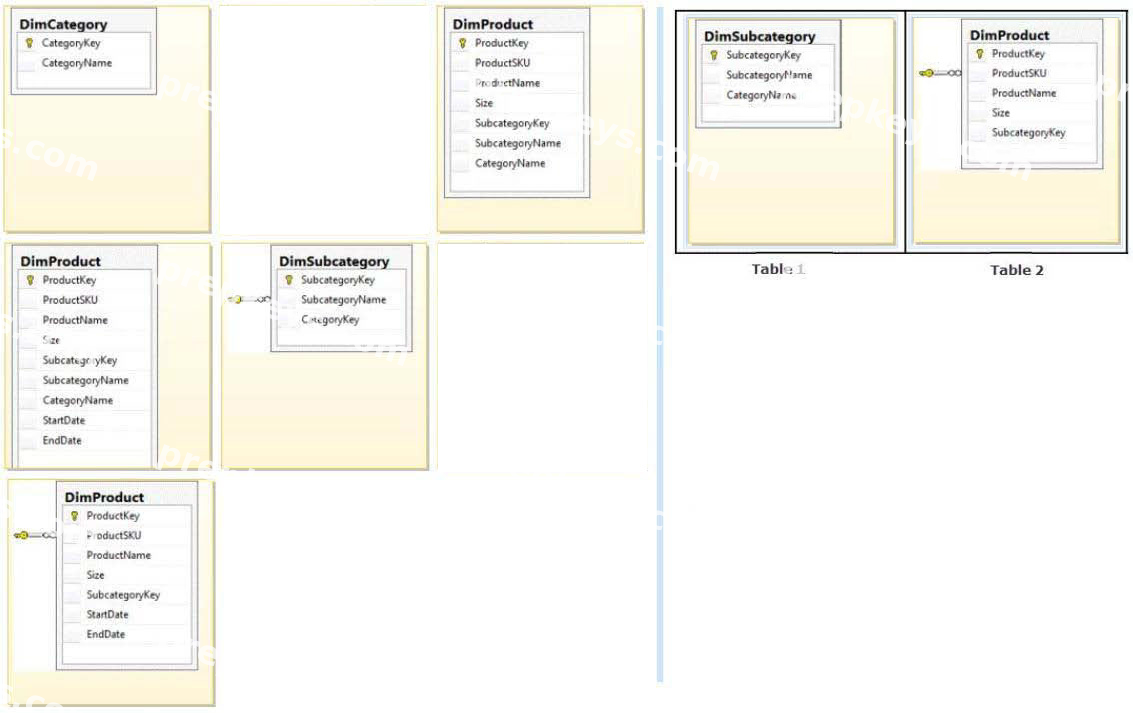
DRAG DROP

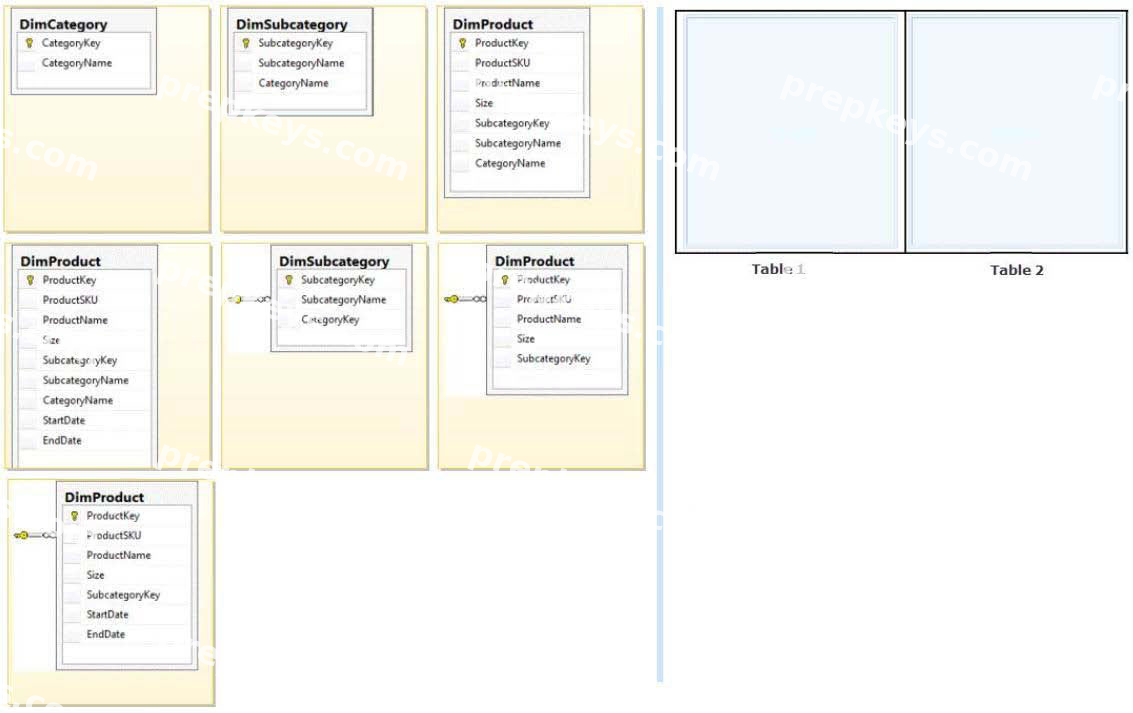
You need to extend the schema design to store the product dimension data.

Which design should you useTo answer, drag the appropriate table or tables to the correct location or locations in the answer area. (Fill from left to right. Answer choices may be used once, more than once, or not all.)

Question 7
Single choice

You need to configure package execution logging to meet the requirements.

What should you do?

A.

Configure logging in each ETL package to log the OnError, Onlnformation, and Diagnostic events.

B.

Set the SSIS catalog's Server-wide Default Logging Level property to Performance. C set the SSIS catalog's Server-wide Default Logging Level property to Basic.

C.

Set the SSIS catalog's Server-wide Default Logging Level property to Verbose.

D.

Configure logging in each ETL package to log the OnError, OnPreExecute, and OnPostExecute events.

Question 8
Single choice

You need to create the Sales Reporting shared SSR5 data source.

Which SSRS data connection type should you use?

A.

OData

B.

Microsoft SQL Server

C.

ODBC

D.

OLE DB

Question 9
Multiple choice

You need to select an appropriate tool for creating the Regional Sales report.

Which tool or tools should you use(Each correct answer presents a complete solution. Choose all that apply.)

A.

Excel 2010, using the CUBE functions

B.

Power View, using a Matrix

C.

Excel 2010, using a PivotTable

D.

Report Builder, using a Matrix

Question 10
Multiple choice

You need to create the calculation for SalespersonName.
What should you do(Each correct answer presents a complete solution. Choose all that apply.)

A.

Create a computed column in the data warehouse's DimSalesperson table. Include the column in the Sales Reporting model's Salesperson table.

B.

Modify the data warehouse's DimSalesperson table and add a new column. Use an UPDATE statement to populate the new column with values. Update the SSIS package developed to populate the data warehouse's DimSalesperson table to use a Derived Column transformation to produce the calculation.

C.

Configure the Sales Reporting model's Salesperson table properties to be based on a query. Define a derived column in the query.

D.

Add a calculated column to the Sales Reporting model's Salesperson table by using the Data Analysis Expressions (DAX) language CONCATENATE function.

E.

Create a view in the data warehouse that defines a derived column based on the DimSalesperson

table. Base the Sales Reporting model's Salesperson table on the view. Include the column in the Sales Reporting model's Salesperson table.

F.

Add a calculated column to the Sales Reporting model's Salesperson table by using the Data Analysis Expressions (DAX) language ADDCOLUMNS function.

Showing 10 of 187 questions · Unlock the full set