Exit demo 70-496 Administering Visual Studio Team Foundation Server 2012 PDF format · free preview

Microsoft 70-496 - Questions & Answers

Free preview · every answer includes a full explanation

Product page: https://prepkeys.com/70-496.html

Question 1
Single choice

You are planning to install a new Microsoft Visual Studio Team Foundation Server (TFS) 2012 server.

You need to ensure that the minimum supported version of Microsoft SQL Server is installed.

Which version should you install?

A.

SQL Server 2005

B.

SQL Server 2008 32-bit

C.

SQL Server 2008 64-bit

D.

SQL Server 2008 R2

E.

SQL Server 2012

Question 2
Single choice

To support your development team's upgrade from Visual Studio 2010 to Visual Studio 2012, you also upgrade from Team Foundation Server (TFS) 2010 to TFS
2012.

You need to provide a TFS 2012 test environment that:

Includes data and source code from your existing TFS 2010 environment and Allows your developers to test the new TFS 2012 and Visual Studio 2012 features while keeping the current TFS 2010 environment intact.

What should you do?

A.

Install TFS 2012 side-by-side on the same server as TFS 2010. Point TFS 2012 to the existing database, SharePoint, and SQL Reporting Services.

B.

Install TFS 2012 on a new server. Point TFS 2012 to the existing database, SharePoint, and SQL Reporting Services.

C.

Clone the existing TFS 2010 environment (including the existing database, SharePoint, and SQL Reporting Services) on new servers and update the internal IDs. Upgrade the cloned environment to TFS 2012.

D.

Copy the existing TFS 2010 database, SharePoint, and SQL Server Reporting services to a new set of servers. Install TFS 2012 side-by-side on the same hardware as TFS 2010, and point TFS 2012 to the new servers.

Question 3
Single choice

Your network environment includes a Microsoft Visual Studio Team Foundation Server (TFS) 2012 server and a virtual test environment that uses Lab Management 2012 along with System Center Virtual Machine Manager (SCVMM) 2010.

You want to install a test virtual machine that is hosted within a lab environment.

You need to ensure that the test virtual machine can support all the features of Lab Management 2012.

Which component should you install on the test virtual machine?

A.

Agents for Visual Studio 2012

B.

Visual Studio Build Agent 2012

C.

Visual Studio Test Agent 2012

D.

Visual Studio Lab Agent 2012

Question 4
Single choice

Your network environment includes a Microsoft Visual Studio Team Foundation Server (TFS) 2012 server named TFS1. SharePoint and Reporting Services components are also installed and configured for TFS on the same server.

You need to be able to access the SharePoint Project Portal from the TFS server by using the following URL: http: //tfs.fabrikam.com.

What should you do?

A.

From the TFS Administration Console, edit the SharePoint Web Application URL.

B.

From Visual Studio Team Explorer, edit the portal settings.

C.

Run the TFSC0nfIg.exe SharePointportal command.

D.

From the SharePoint Central Administration website, configure the Alternate Access Mappings.

Question 5
Single choice

Your network environment includes a Team Foundation Server (TFS) 2012 named TFS1 that contains two project collections named PC1 and PC2. A build server named Bi is configured with a build controller named C1 and an agent named A1 that runs build definitions created in Pd.

A development team wants to create a gated check-in build definition on PC2.

You need to perform a supported infrastructure enhancement to run PC2 build definitions.

What should you do?

A.

- Add a new build server (B2).
- On the B2 build server, migrate controller C1 and install a new controller (C2) that connects to the PC2 project collection.
- On the Bi build server, configure a second build agent (A2) that uses the C2 controller.

B.

- Add a new build server (B2).
- On the B2 build server, install a build controller (C2) that connects to the PC2 project collection.
- On the B2 build server, configure a second build agent (A2) that uses the C2 controller.

C.

- On the Bi build server, configure the C1 controller to connect to project collections PC1 and PC2.
- On the Bi build server, update the Al agent to use controllers C1 and C2.

D.

- On the Bi build server, configure the C1 controller to connect to project collections PC1 and PC2.
- On the Bi build server, configure a second build agent (A2) that uses the C2 controller.

Question 6
Single choice

Your network environment is configured according to the following table:
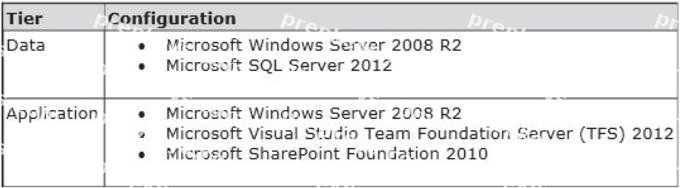
Your TFS environment is configured with the following URLs:

TFS: http: //tfssrv: 8080/tfs
Reporting: http: //tfssrv/reports
SharePoint: http: //tfssrv/sites
You need to configure only the TFS URL to be the following fully qualified domain name (FQDN): http: //tfs.contoso.com.

You log on to the application-tier server.

What should you do next?

A.

In the IIS Manager, select TFS Website and configure the host name with the friendly name.

B.

In the TFS Administration Console, go to the Change URIs dialog box and enter the friendly URL in the Notification URL text box.

C.

In the IIS Manager, select TFS Website and configure the server URL with the friendly name.

D.

In the TFS Administration Console, go to the Change URIs dialog box and enter the friendly URL in the Server URL text box.

Question 7
Multiple choice

Your network environment includes a Microsoft Visual Studio Team Foundation Server (TFS) 2012 server and a test environment that is based on non-Hyper-V- based virtualized machines.

You need to be able to run tests on all the test machines.

Which two actions should you perform? (Each correct answer presents part of the solution.
Choose two.)

A.

Install System Center Virtual Machine Manager (SCVMM) 2010.

B.

Use Microsoft Test Manager (MTM) to create a new standard environment.

C.

Manually install the Agents for Visual Studio 2012 on the virtualization server.

D.

From Microsoft Test Manager (MTM), create a new System Center Virtual Machine Manager- (SCVMM-) based environment and select the virtual machines hosted on the non-Hyper-V-based virtualization server.

E.

Install a Visual Studio 2012 test controller.

Question 8
Single choice

Your network environment includes a Microsoft Visual Studio Team Foundation Server 2012 (TFS) server. A single build machine is installed with one controller and two agents. The working directories are configured to use the following working directory:

$(SystemDrive)\Builds\$(BuildAgentId)\$(BuildDefinitionPath). Your system drive is running out of space and some builds often fail with the following error:
"The specified path, file name, or both are too long. The fully qualified file name must be less than 260 characters, and the directory name must be less than 248 characters."

You need to meet the following requirements:

Point the working path to drive D.
Construct a working directory that can be used to define the shortest unique path for each build agent it is used on.

What should you do?

A.

Set the Build Agent working directory path to D: \BId\$(BuildAqentld)\$ (BuildDetinitionPath).

B.

Create a system variable named BuildDrive and set its value to D: \.

C.

Set the Build Service working directory path to D: \BId\$(BuildAqentld)\$ (BuildDefinitionPath).

D.

Set the Team Foundation Build variable named $(BuildDrive) to the value D: \.

Question 9
Single choice

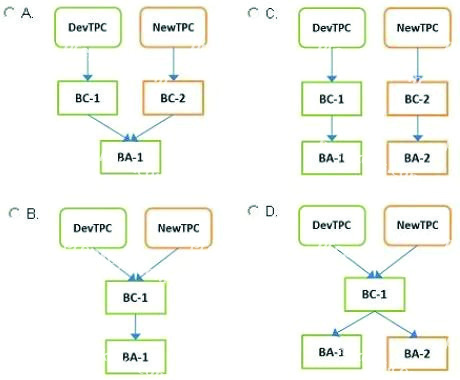
Your network environment includes a Microsoft Visual Studio Team Foundation Server (TFS) 2012 server. Your TFS environment currently consists of a single team project collection (TPC) named DevTPC, one build controller named BC-1, and one build agent named BA-1.

You need to create a separate TFS test environment by cloning your existing environment. You need to achieve this goal by utilizing as few new TFS services as possible.

Which of the following diagrams shows the correct architecture for solving this problem?
A.

Option A

B.

Option B

C.

Option C

D.

Option D

Question 10
Single choice

Your client's network environment includes a Microsoft Visual Studio Team Foundation Server (TFS) 2012) server installed at its main office. Branch offices have limited bandwidth connecting to the main office.

Client team members at one of the branch offices report that it is taking too long to retrieve files from source control.

You need to speed up the source control access for their most commonly accessed files.

What should you do?

A.

- Install a SQL server at the remote office and configure replication of the source control database from the main office to the SQL server at the remote office.
- Install and configure a TFS proxy server at the remote office to use the replicated database.
- Configure all the clients at the remote office to use the new proxy server

B.

- Install a new TFS instance at the remote office and configure it to sync with the main office.
- Configure all the clients at the remote office to connect to the new TFS instance.

C.

- Install and configure a TFS proxy server at the remote office.
- Configure all the clients at the remote office to use the new proxy server.

D.

- Install and configure a TFS proxy server at the remote office.
- Run the TFSConfig.exe command to redirect remote users to the TFS proxy server based on IP address.
- Install and configure a TFS proxy server at the remote office.
- Run the TFS Admin Console command to redirect remote users to the TFS proxy server based on IP address.

Showing 10 of 97 questions · Unlock the full set