Microsoft 70-698 - Questions & Answers
Free preview · every answer includes a full explanation
Product page: https://prepkeys.com/70-698.html
You have a computer named Computer1 that runs Windows 10.
Computer1 is infected by a virus.
You fail to access the Settings app on Computer1 due to the virus.
You need to restart the computer and ensure that Computer1 displays the advanced startup options when the computer restarts.
What are two possible ways to achieve the goal? Each correct answer presents a complete solution.
company has client devices that run Windows 7 Professional with Service Pack 1 or Windows 8 Pro. The company plans to use Windows telemetry and Upgrade Readiness to upgrade all devices to Windows 10
Pro.
You need to ensure that you can collect the Upgrade Readiness inventory and telemetry data.
What should you do first?
You have four computers configured as shown in the following table:
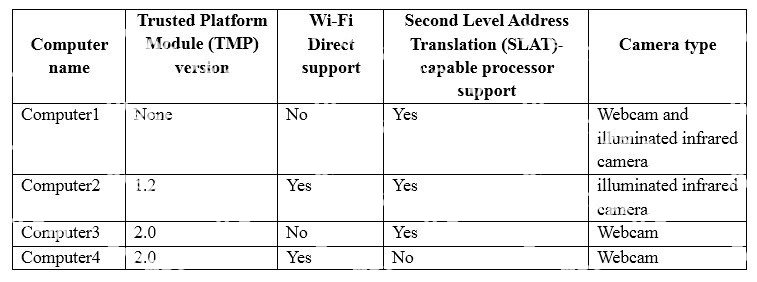
You need to deploy Windows 10 Enterprise. The deployment must support Miracast, BitLocker Drive Encryption (BitLocker), and Windows Hello with facial recognition.
On which computer should you install Windows 10?
A user has a laptop named Computer 1 that runs Windows 10 and has a 64-bit application named App1 installed.
App1 fails to launch and generates an error message indicating that the application is not supported on this version of Windows.
You need to ensure that App1 can run successfully.
What should you do?
Group Policy is a set of rules which control the working environment of user accounts and computer
accounts. Group Policy provides the centralized management and configuration of operating systems, applications and users' settings in an Active Directory environment.
In other words, Group Policy in part controls what users can and can't do on a computer system.
Which one of these policies requires a reboot?
You are the administrator for a company. All devices run Windows 10 Pro. File and printer sharing is turned on.
Users report that files in the Public folder are being modified and changed by other users on the network.
You need to ensure that only specific users and groups can access files in the Public folder share.
What should you do?
You deploy a new computer named Computer1.
You have a file named Data.docx that is stored in Microsoft OneDrive.
From File Explorer, you attempt to open Data.docx, but you discover that the file is corrupt.
You need to access a previous version of Data. docx.
What should you use?
You are the administrator for a company. All devices run Windows 10 Enterprise and are joined to an Active Directory Domain Services domain.
Administrators are unable to test network connectivity to Windows 10 devices because ping is being blocked.
You need to be able to ping the devices.
Solution: Turn on File and Printer Sharing in the Advanced Sharing settings.
Does the solution meet the goal?
A company has client computers that run Windows 10. The client computer systems frequently use IPSec tunnels to securely transmit data.
You need to configure the IPSec tunnels to use 256-bit encryption keys.
Which encryption type should you use?
Note: This question is part of a series of questions that use the same scenario. For your convenience, the scenario is repeated in each question. Each question presents a different goal and answer choices, but the text of the scenario is exactly the same in each question in this series.
Start of repeated scenario
Your network contains a single Active Directory domain named contoso.com. All computers are members of the domain and run the 64-bit version of Windows 10 Enterprise.
On a test computer named Computer_Test1, you pin several company-specific applications in a group named Contoso Apps, and then you export the start menu layout to a file named contoso.xml.
You install Client Hyper-V on a computer named Computer6.
You identity the following requirements.
- Install the Hyper V feature on a computer named Computer1.
- Use virtual smart card authentication on a computer named Computer2.
- Enable Secure Boot on a computer named Computer3.
- Connect a computer named Computer4 to a projector by using Miracast.
- Ensure that a user named User 1 can use keyboard shortcuts by pressing one key at a time.
- Ensure that you can share the clipboard between Computer6 and the virtual machines running on
Computer6.
- Add the Contoso Apps group to the Start menu of a computer named Computer7.
End of repeated scenario.
You install all of the Contoso apps on Computer7.
You need to meet the requirements of Computer7.
What should you do?