Microsoft 70-778 - Questions & Answers
Free preview · every answer includes a full explanation
Product page: https://prepkeys.com/70-778.html
You have a Power BI report that is configured to use row-level security (RLS).
You have the following roles:
A manager role that limits managers to see only the sales data from the stores they manage.
A region role that limits users to see only the data from their respective region
You plan to use Power BU Embedded to embed the report into an application. The application will authenticate the users.
You need to ensure that RLS is enforced when accessing the embedded report.
What should you do?
You attempt to publish a Microsoft Excel file to Power BI, and you receive the error message shown in the exhibit. (Click the Exhibit button.)
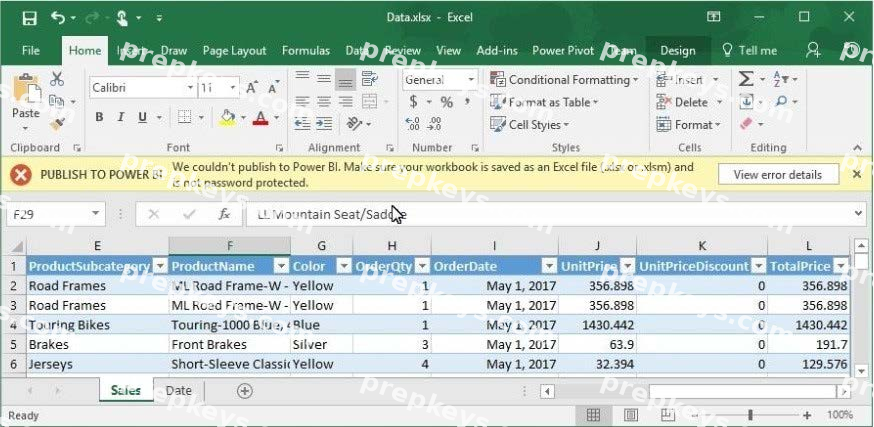
The file is in c:\data\.
You need to ensure that you can publish the file to Power BI.
What should you do first?
Note: This question is part of a series of questions that use the same scenario. For your convenience, the scenario is repeated in each question. Each question presents a different goal and answer choices, but the text of the scenario is exactly the same in each question in this series.
Start of repeated scenario.
You have a Microsoft SQL Server database that has the tables shown in the Database Diagram exhibit. (Click the Exhibit button.)
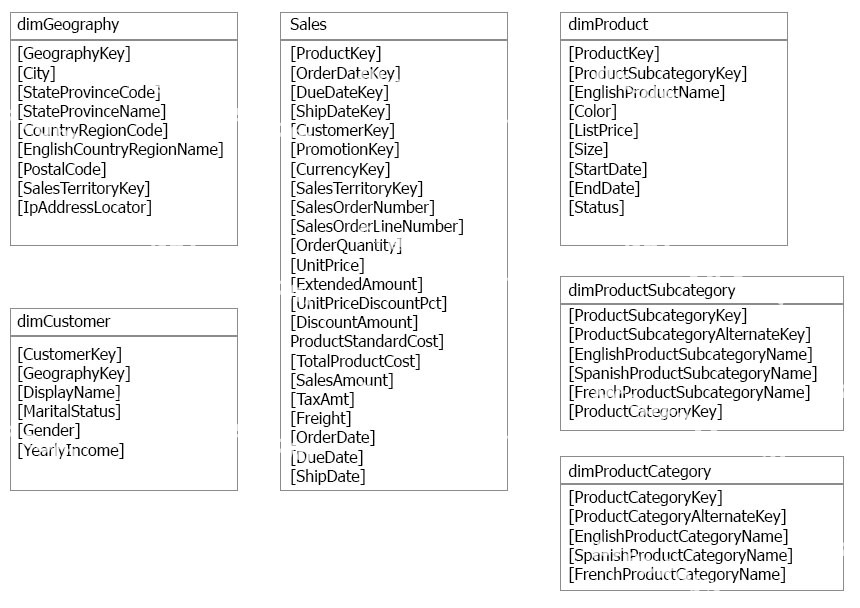
You plan to develop a Power BI model as shown in the Power BI Model exhibit. (Click the Exhibit button.)
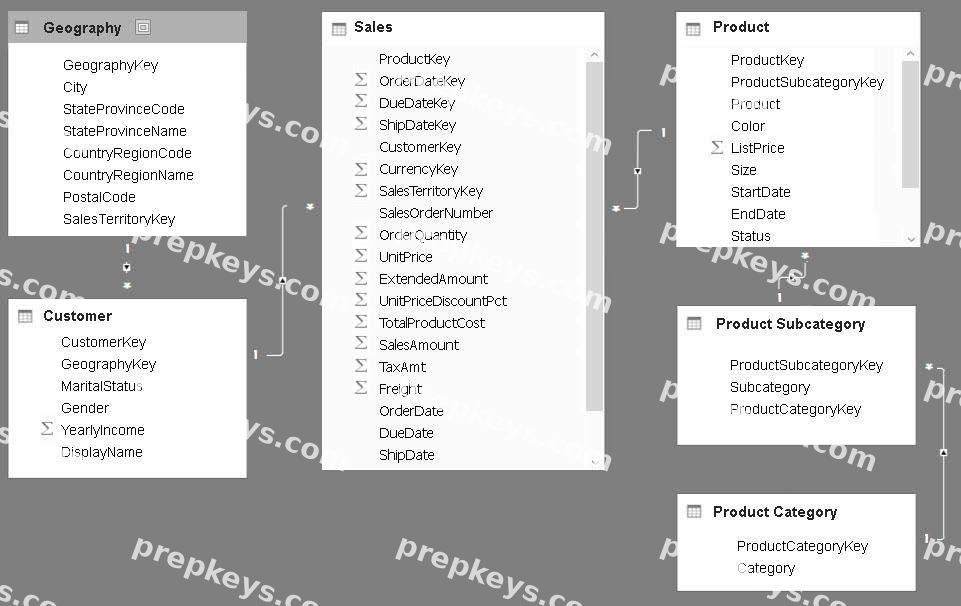
You plan to use Power BI to import data from 2013 to 2015.
Product Subcategory[Subcategory] contains NULL values.
End of Repeated Scenario.
You implement the Power BI model.
You plan to add a table named Date to the model. The table will have columns for the date, year, month, and end of the last month, and will include data from January 1, 2013 to December 31, 2015.
The Date table and the Sales table will have a relationship.
Which DAX functions should you use to create the columns?
You have a Power BI dashboard that displays different visualizations of company sales.
You enable Q&A on the dashboard.
You need to provide users with sample questions that they can ask when using Q&A.
Which settings should you modify from the Power BI Settings?
Note: This question is part of a series of questions that present the same scenario. Each question in the series contains a unique solution that might meet the stated goals. Some question sets might have more than one correct solution, while others might not have a correct solution.
After you answer a question in this section, you will NOT be able to return to it. As a result, these questions will not appear in the review screen.
You have an app workspace that contains a report. The report contains sensitive data.
You need to ensure that you can embed the report into a custom application that will be accessed by external users. The external users will NOT have a Microsoft Azure Active Directory user account or Power
BI licenses.
Solution: Purchase Power BI Premium P1, and then configure the app workspace to run in a dedicated capacity.
Does this meet the goal?
Note: This question is a part of a series of questions that present the same scenario. For your convenience, the scenario is repeated in each question. Each question presents a different goal and answer choices, but the text of the scenario is exactly the same in each question in this series.
Start of repeated scenario
You have a Microsoft SQL Server database that has the tables shown in the Database Diagram exhibit. (Click the Exhibit.)
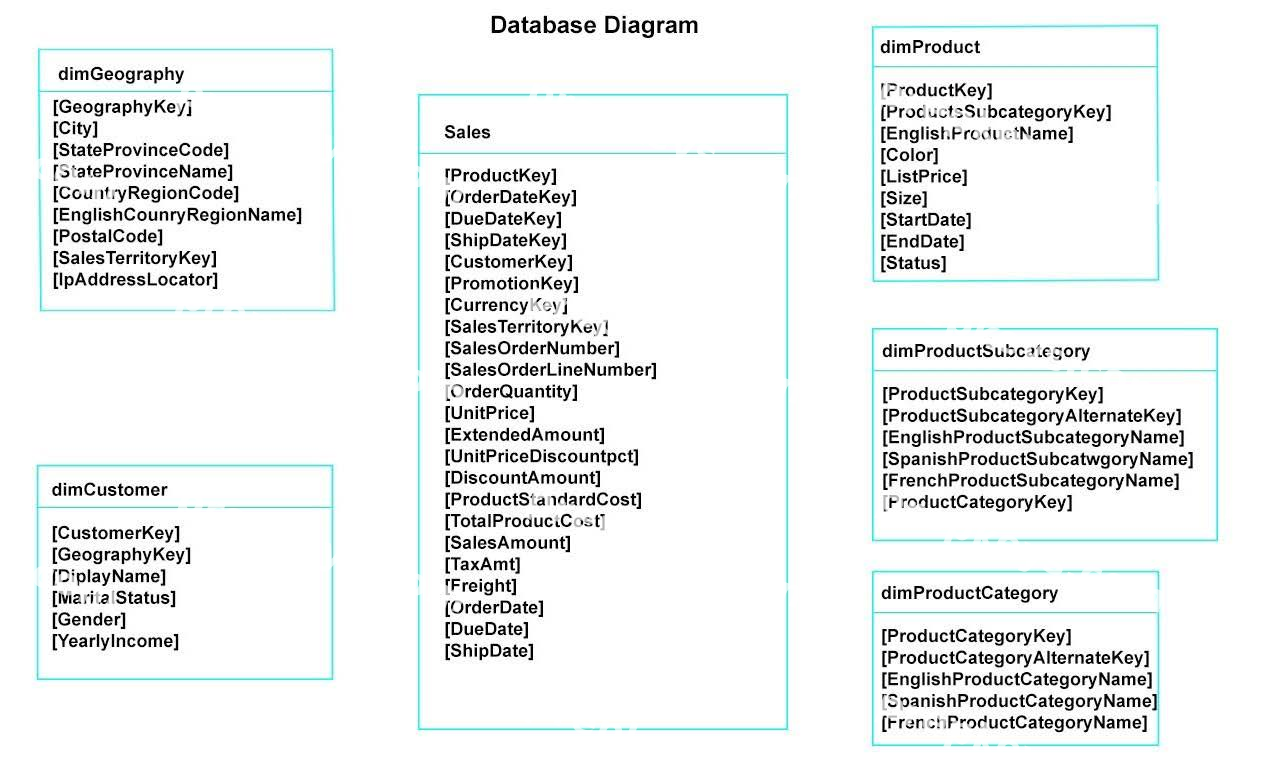
You plan to develop a Power BI model as shown in the Power BI Model exhibit. (Click the Exhibit).
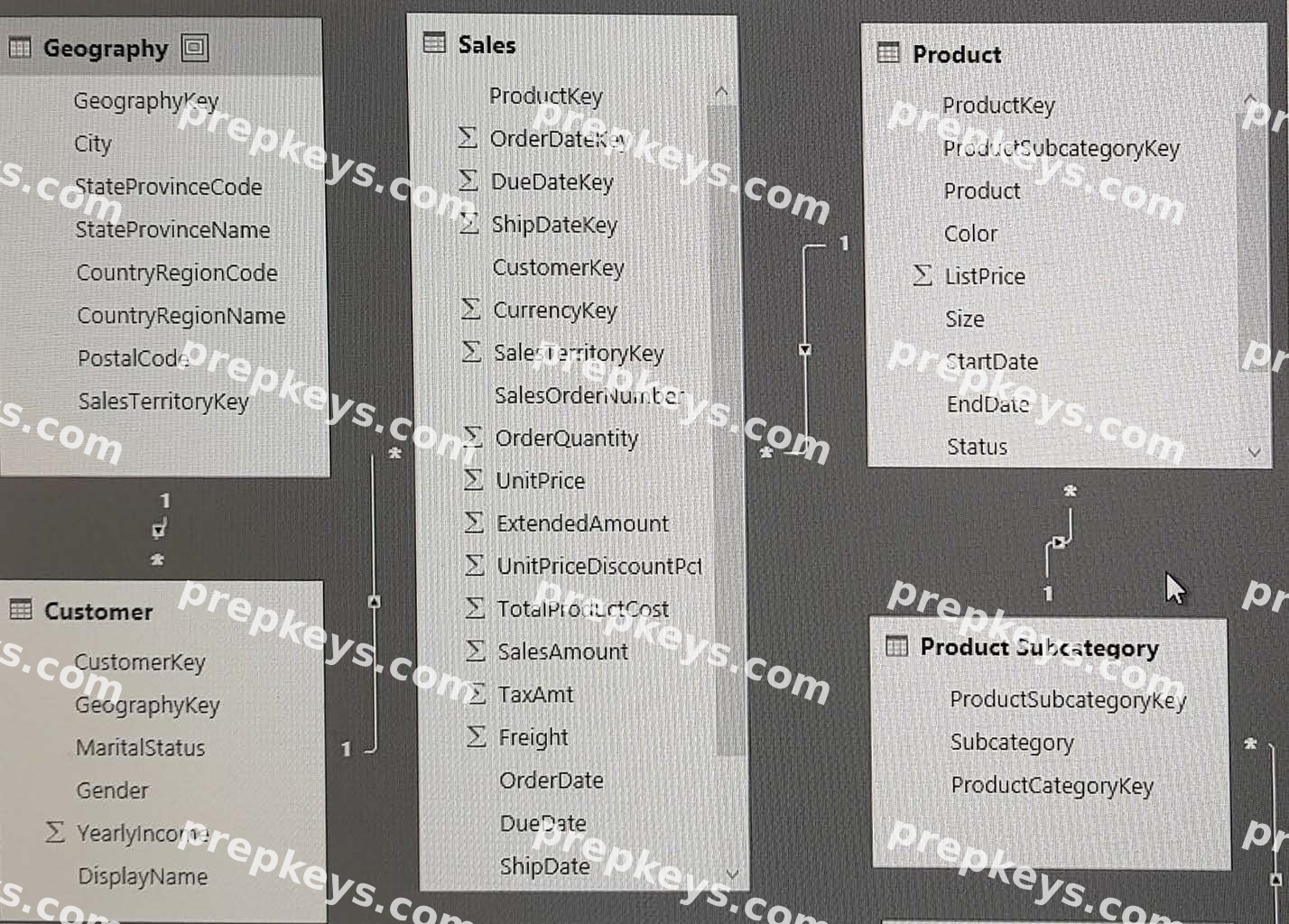
You plan to use Power BI to import data from 2013 to 2015.
Product Subcategory [Subcategory] contains NULL values.
End of repeated scenario.
You implement the Power BI model.
You need to add a new column to the Product Subcategory table that uses the following formula.
=if [Subcategory] =null then "NA" else [Subcategory]
Which command should you use in Query Editor?
Note: This question is part of a series of questions that present the same scenario. Each question in the series contains a unique solution that might meet the stated goals. Some question sets might have more than one correct solution, while others might not have a correct solution.
After you answer a question in this section, you will NOT be able to return to it. As a result, these questions will not appear in the review screen.
You have a user named User!. User1 is a member of a security group named Contoso PowerB1.
User1 has access to a workspace named Contoso Workspace.
You need to prevent User1 from exporting data from the visualizations in Contoso Workspace.
Solution: From the Power B1 Admin portal, you modify the Tenant settings.
You have an app workspace that contains two datasets named dataset1 and dataset2. Dataset1 connects to a Microsoft Azure SQL database. Dataset2 connects to a Microsoft Excel file stored in Microsoft OneDrive for Business.
You create a report named Report1 that uses dataset1.
You pin Report1 to a dashboard named Dashboard1.
You publish the app workspace to all the users in your organization.
You need to delete dataset2 from the app workspace.
What should you do first?
Note: This question is part of a series of questions that present the same scenario. Each question in the series contains a unique solution that might meet the stated goals. Some question sets might have more than one correct solution, while others might not have a correct solution.
After you answer a question in this section, you will NOT be able to return to it. As a result, these questions will not appear in the review screen.
You have a user named User1. User1 is a member of a security group named Contoso PowerBI.
User1 has access to a workspace named Contoso Workspace.
You need to prevent User1 from exporting data from the visualizations in Contoso Workspace.
Solution: From the Microsoft Office 365 Admin center, you remove User1 from the All Users security group.
Does this meet the goal?
Note: This question is a part of a series of questions that present the same scenario. For your convenience, the scenario is repeated in each question. Each question presents a different goal and answer choices, but the text of the scenario is exactly the same in each question in this series.
Start of repeated scenario
You have a Microsoft SQL Server database that contains the following tables.
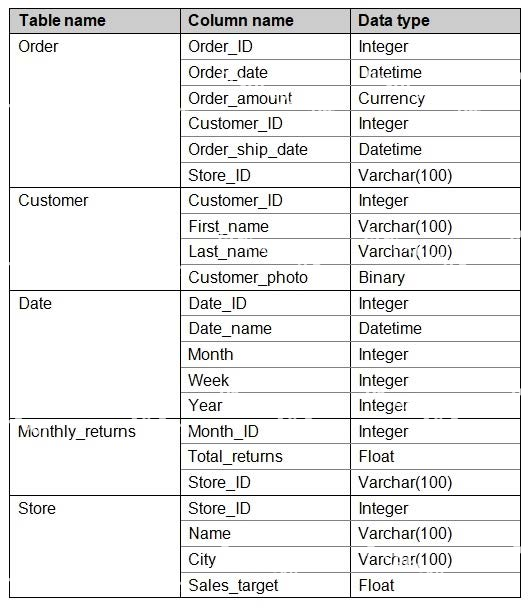
The following columns contain data information:
Date[Month] in the mmyyyy format Date[Date_ID] in the ddmmyyyy format Date[Date_name] in the mm/dd/yyyy format Monthly_returns[Month_ID] in the mmyyyy format
The Order table contains more than one million rows.
The Store table has relationship to the Monthly_returns table on the Store_ID column. This is the only relationship between the tables.
You plan to use Power BI desktop to create an analytics solution for the data.
End of repeated scenario.
You are modifying the model to report on the number of order.
You need to calculate the number of orders.
What should you do?