Microsoft 74-338 - Questions & Answers
Free preview · every answer includes a full explanation
Product page: https://prepkeys.com/74-338.html
You are a member of the CsAdministrator group that supports the datacenter for the Contoso company. The Contoso datacenter runs Microsoft Lync Server 2013.
The Central Management Store is hosted on the principal back-end database.
The back-end database is configured to use synchronization mirroring without a witness. You want to perform maintenance on the principal back-end database.
You need to failover the mirrored database.
What should you do?
You support a customer whose network environment includes Microsoft Lync 2013 deployed in a datacenter that has two pools, named PoolA and PoolB. Both PoolA and PoolB have Microsoft Lync Server 2013 installed. You use the Lync Management Shell for all administrative actions.
You run the Invoke-CsPoolFailover PowerShell cmdlet and you receive the following message: Invoke-CsPoolFailOver: This Front-end pool "poolA.contoso.com" is specified in topology as the next hop for the Edge server. Failing over this pool may cause External access/Federation/Split-domain/XMPP features to stop working. Please use Topology Builder to change the Edge internal next hop setting to point to a
different Front-end pool, before you proceed.
You need to fail over PoolA only.
What should you do?
You are a member of the CsAdministrator group that supports the Microsoft Lync datacenter for the Contoso company. The datacenter consists of one pool that is running Lync 2013. Contoso has a second Active Directory Domain Services (AD DS) site with a domain controller.
The Lync server pool fails.
You need to recover the Central Management Store (CMS) and users.
Which three actions should you perform?
(Each correct answer presents part of the solution. Choose three.)
You support a Microsoft Lync Server 2013 environment.
The network includes:
Users report intermittent outbound PSTN call failures. There are no issues with inbound PSTN calls. You view the event log information as shown in the exhibit. (Click the Exhibit button.)
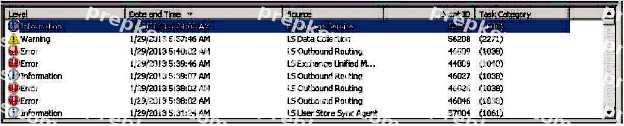
You need to find out why outbound calls are failing.
Which two event IDs should you investigate? (Each correct answer presents a complete solution.
Choose two.)
You are a member of the CsAdministrator group that supports the Microsoft Lync 2013 datacenter for the Contoso company. The Contoso datacenter has 65,000 users. The datacenter has two pools, named ConPool01 and ConPool02. Both pools run Microsoft Lync Server 2013. The Central Management Store is hosted on ConPool01.
The servers that run ConPool01 suffer a catastrophic failure. You want users hosted on ConPool01 to be supported permanently on ConPool02.
You need to fail over ConPool01.
100% Real Q&As | 100% Real Pass
What should you do?
You administer a Microsoft Lync Server 2010 Standard Edition server in your network environment. You deploy a Microsoft Lync Server 2013 Standard Edition server.
You want to migrate users from Lync Server 2010 to Lync Server 2013. You migrate a test account from Lync Server 2010 to Lync Server 2013.
You start the Lync 2013 client on one of your test computers and start testing various modalities. During testing, you decide to test the Meet Now functionality in Lync 2013 client.
Meet Now starts a conference and fails to connect.
You start Clslogging.exe. You generate a log that includes the following information:
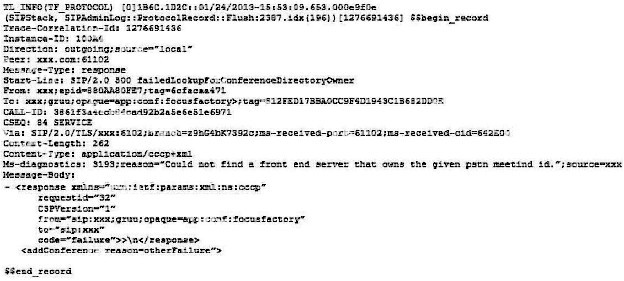
You need to identify the cause of the issue.
What should you do first?
You deploy Microsoft Lync Server 2013 Enterprise Edition and create a pool named Lync2013pool.Contoso.local. You configure the Lync admin URL to be admin.contoso.local. The Front End and Back End roles are installed on servers named FE2013 and BE2013.

You attempt to open the Lync Server Control Panel and you receive an error message. You need to be able to open the Lync Server Control Panel.
Which two actions should you perform?
(Each correct answer presents part of the solution. Choose two.)
You are a member of the CsAdministrator group that supports the Lync datacenter for your company. The datacenter consists of one pool that is running Microsoft Lync Server 2013. You deploy SQL Mirroring.
The principal server fails and you are unable to perform a manual failover for more than an hour. Users are placed into resiliency mode.
You need to ensure that failover occurs automatically and without administrator intervention.
What should you do?
You support a Microsoft Lync Server 2013 Enterprise pool deployed in a high availability configuration for Back End Servers named Backend 1 and Backend2.
You execute the Get-CSDatabaseMirrorState cmdlet and discover the following errors.
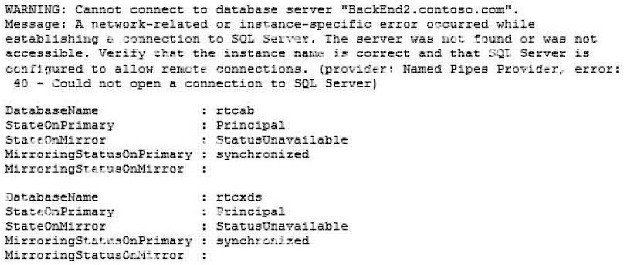
You need to resolve the connectivity issue and bring up the mirror databases to the synchronized state between the Back End Servers.
What should you do?
You support a Microsoft Lync Server 2013 Enterprise pool named Lync2013.contoso.local. The pool is configured with two Session Initiation Protocol (SIP) domains named litware.com and fabrikam.com.
The environment also includes the following:
You plan to install a single Edge Server. You create an Edge pool named Lync2013Edge.contoso.local.
You want to configure the following Edge services:
You also want to enable the federated access feature.
You need to assign internal and external certificates to the Lync 2013 Edge server.
Which two actions should you perform? (Each correct answer presents part of the solution. Choose two.)