Microsoft 77-888 - Questions & Answers
Free preview · every answer includes a full explanation
Product page: https://prepkeys.com/77-888.html
Rick works as an Office Assistant for Tech Perfect Inc. The company has a Windows-based network.
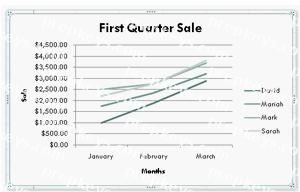
Rick wants to display data series, categories, data markers, and axes in the report.
Which of the following actions will Rick take to accomplish the task?
Rick works as an Office Assistant for Tech Perfect Inc. The company has a Windows-based network.
Rick is creating a project through Microsoft Excel 2010. The project on which he is working has 98 project tasks and 57 team members. Rick wants to check the progress of his project quickly and easily.
Which of the following will Rick use to accomplish the task?
You work as an Office Assistant for Blue Well Inc. The company has a Windows-based network. You want to quickly filter data in a PivotTable report without opening drop-down lists to find the items that you want to filter. For this purpose, you are required to use a slicer.
Which of the following are the ways that you can use to accomplish the task?
Each correct answer represents a complete solution. Choose all that apply.
You work as an Office Assistant for Tech Perfect Inc. You are working in the spreadsheet of the company's high selling products. You want to find out the matching values in the columns. While doing so, you get an
unexpected error that when you attempt to look up or match a lookup_value within an array; Excel is not
able to recognize the matching value. You want to store sets of values as text and convert sets of data to text by using Excel's Text To Columns tool. Which of the following steps will you take to accomplish the task?
Each correct answer represents a part of the solution. Choose all that apply.
You work as an Office Assistant for Tech Perfect Inc. You are working in a spreadsheet. You observe that
while trying to look up or match a lookup_value within an array, Excel is not able to recognize the matching value. Which of the following are the reasons that are causing the above problem?
Each correct answer represents a complete solution. Choose all that apply.
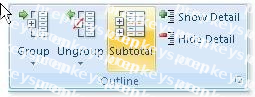
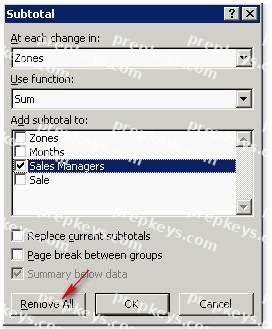
You work as an Office Assistant for Tech Tree Inc. You have created a report in a workbook in Microsoft Excel 2010. You have included various subtotals in a worksheet in the report to verify data accuracy. You want to remove all subtotals from the sheet before you send it to your manager.
Which of the following steps will you take to accomplish the task with the least administrative effort?
You work as an Office Assistant for Tech Perfect Inc. You are working in the spreadsheet of the company's high selling products. You input a formula for calculating the monthly sell of a particular product but your Excel cell shows a string of # symbols instead of returning a value as shown below:
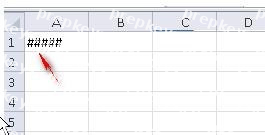
Which of the following are the reasons that are causing the above problem? Each correct answer represents a complete solution. Choose all that apply.
You work as a Sales Manager for Maini Industries. Your company manufactures and sells construction equipment. You have to create a report that will show the highest selling items of each month. The report will be in the following format:
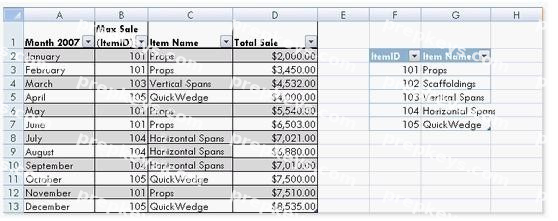
In a workbook, you create a table named Item_table as shown below:
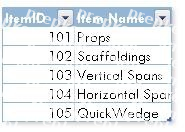
You fill in the required entries in the workbook.
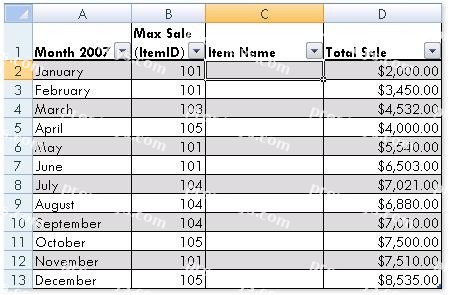
For the third column of the sheet, you want to use formulas to fill in the values. You want the cells in the third column to get automatically filled with the names corresponding to ItemID in the second column. You want the exact values to be filled in the column. You select the C2 cell in the third column.
Which of the following formulas will you enter in order to accomplish the task?
You work as an Office Manager for Blue Well Inc. The company has a Windows-based network. You have two budget situations in which one is the worst case and the other is the best case. You want to create both situations on the same worksheet and then switch between them with the change in requirements.
Which of the following will you use to accomplish the task?
Which of the following is used to display a trend based on adjacent data in a clear and compact graphical representation by taking up a small amount of space?