Exit demo 9A0-096 Adobe AfterEffects CS4 Exam PDF format · free preview

Adobe 9A0-096 - Questions & Answers

Free preview · every answer includes a full explanation

Product page: https://prepkeys.com/9a0-096.html

Question 1
Single choice

In the Paint panel, what does the Flow attribute affect?

A.

the maximum amount of paint applied

B.

how quickly paint is applied or removed

C.

the ratio between the short and long axes of a brush

D.

how pixels in the underlying image are blended with the pixels painted

Question 2
Single choice

You are interpolating between two keyframed mask shape paths by using the Sm art Mask Interpolation panel.

Which option in the Smart Mask Interpolation panel lets you control how Smart Mask Interpolation matches vertices one keyframe to another keyframe?

A.

Quality

B.

Matching Method

C.

First Vertices Match

D.

Bending Resistance

E.

Add Mask Shape Vertices

Question 3
Single choice

How can you find out the number vertices of a mask?

A.

select the mask in the timeline and look in the Info panel

B.

select the mask in the timeline, open the Mask properties and look under Mask Path

C.

select the mask in the Composition panel, right-click on it, select Mask and select Vertices at the bottom of the menu

D.

select the mask in the Composition panel, go to Layer > Mask > Mask Shape to bring up the Mask
Shape dialog box containing the vertices information

Question 4
Single choice

You have applied Motion Blur to an animating mask shape.

Which option lets you control the amount of blurring to the mask as it animates?

A.

Mask Feather

B.

Mask Expansion

C.

Layer > Masks > Motion Blur

D.

Composition Settings > Advanced > Sh utter Angle

E.

Composition Settings > Advanced > Shutter Phase

Question 5
Single choice

What should you do to apply permanent motion blur to a mask?

A.

select the mask, then choose Layer > Mask > Motion Blur > On

B.

select the mask, then choose Layer > Mask > Motion Blur > Same As Layer

C.

select the mask, then click the Motion Blur switch for the layer in the timeline

D.

select the mask, then click the Composition Motion Blur switch in the timeline

Question 6
Single choice

When pasting a mask path from an After Effects layer into the Position property for an object in the Timeline panel, the size of the resulting motion path needs to be a different size than the original mask path.

Which action lets you resize the motion path?

A.

apply the Free Transform Points command to the po sition keyframes

B.

convert the roving keyframes created when pasting the path to the Position property into Bezier keyframes

C.

resize the mask path in a solid layer the size of the composition before pasting the path into the Position property

D.

set the Display > Motion Path section of After Effects Preferences to show all keyframes before pasting
the path into the Position property

Question 7
Single choice

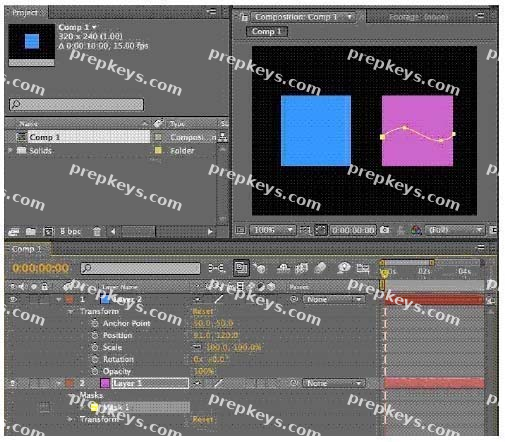
Click the Exhibit button.

You are working in a composition that has the two layers shown in the exhibit. La yer 1 has a mask applied to it. You wish to animate the position of Layer 2 using the mask path coordinates from Layer 1.

What is the most efficient process?

A.

select Layer 2, then use the Parent drop-down menu option next to the layer in the timeline to set its parent layer to Layer 1

B.

select Layer 1, open the Mask attributes in the timeline, select the Mask Path and go to Edit > Copy,
then select Layer 2 and go to Edit > Paste

C.

select Layer 1, open the Mask attributes in the timeline, select the Mask Path and go to Edit > Copy,
then select Layer 2, open the Transform attributes, select the Position property, and go to Edit > Paste

D.

open the Mask attributes for Layer 1 in the timeline, select Layer 2, open its Transform attributes, and set an expression for the Position by pressing Option/ALT and clicking the stopwatch, then drag the pick whip icon onto the Mask Path of Layer 1

Question 8
Single choice

When working in an After Effects Composition panel, you need to lock the current composition viewer, split the current frame, and create a new composition viewer in the frame.

Which action performs this function in the Composition panel?

A.

choose Maximize Frame from the Composition panel menu

B.

press Ctrl+Alt+Shift+N (Windows) or Command+Option+Shift+N (Mac OS) o n the keyboard

C.

lock the Composition panel and choose Maximize Frame from the Composition panel menu

D.

Ctrl (Windows) or Command (Mac OS) drag the gripper area in the upper-left corner of the Composition panel into the center of the work area

E.

Ctrl (Windows) or Command (Mac OS) drag the group gripper in the upper-right corner of the Composition panel into the center of the work area

Question 9
Single choice

When previewing an After Effects composition that contains several nested compositions, a Timeline panel different from the current Composition panel plays.

What is causing this scenario?

A.

The Timeline panel is locked.

B.

The Composition panel is locked.

C.

The Maximize Frame command has been enabled for the Timeline panel.

D.

The Maximize Frame command has b een enabled for the Composition panel.

E.

You have selected a nested composition in the Timeline panel with the mouse before previewing.

Question 10
Single choice

Which tool lets you change the point from which transformations happen to a layer in the Composition panel, without changing the layer's appearance or position?

A.

Selection tool

B.

Puppet Pin tool

C.

Pan Behind tool

D.

Convert Vertex tool

E.

Unified Camera tool

Showing 10 of 143 questions · Unlock the full set