Exit demo 9L0-012 Mac Service Certification PDF format · free preview

Apple 9L0-012 - Questions & Answers

Free preview · every answer includes a full explanation

Product page: https://prepkeys.com/9l0-012.html

Question 1
Single choice

Rhonda claims that her Mac cannot connect wirelessly to her AirPort Express network at home.

Which of the following would be the BEST question to ask her FIRST?

A.

Have you tried connecting to a different Wi-Fi network?

B.

Does your ISP support wireless access to the Internet?

C.

Do you have a Thunderbolt to Ethernet adapter?

D.

Have you updated your RAM?

Question 2
Single choice

Power Nap operations on a MacBook Air (Mid 2012) will be suspended until the unit is connected to a power adapter when the charge is at what percentage or less?

A.

10 percent

B.

30 percent

C.

50 percent

D.

75 percent

Question 3
Single choice

What color indicates that the Liquid Contact Indicators inside a MacBook Pro (13-inch, Mid 2012, have been triggered?

A.

Red

B.

Blue

C.

White

D.

Yellow

Question 4
Single choice

What is the likely cause of an iMac (21.5-inch, Late 2013) producing a single error tone at startup that
repeats every five seconds.

A.

The unit does not have RAM or RAM is not installed properly.

B.

The logic board has failed and must be replaced.

C.

The RAM does not pass data integrity tests.

D.

The hard drive has failed S.M.A.R.T. status.

Question 5
Single choice

Apple recommends a DIMM installation scheme for the Mac Pro (Late 2013) that:

A.

Increases processing power

B.

Enhances graphics processing

C.

Optimizes system cooling

D.

Enables use of special memory modules

Question 6
Single choice

You must know the AppleCare name of an Intel iMac before performing which of the following actions?

A.

Starting up from OS X Recovery HD.

B.

Running Mac Resource Inspector.

C.

Replacing the logic board

D.

Resetting the NVRAM.

Question 7
Single choice

Which of the following could indicate accidental damage when inspecting the inside of a Mac mini (Late
2012) before a repair?

A.

Light dust in the fans

B.

Third-party RAM installed

C.

Lint gathered near the rear vents

D.

Oxidation or discoloration of the logic board

Question 8
Single choice

Which of the following is a valid electrical safety precaution when working on a computer or display with exposed, potentially energized parts?

A.

Use only metal screw drivers or fingers as needed to connect or disconnect cables.

B.

Always wear an ESD wrist or heel strap when working on plugged in systems.

C.

Be very careful handling the logic board or power supply while the computer is plugged in.

D.

Remove rings, watches, necklaces, metal-rimmed eyewear and other metallic articles before working on the computer.

Question 9
Single choice

You are inspecting a MacBook Pro as part of your troubleshooting process. You note that two of the screws on the bottom case are damaged. There is no record of the computer being repaired on a previous occasion.
If the resolution to the issue requires that you replace a part, how does your discovery of the stripped screws impact that repair?
A.

You need to thoroughly question the customer on previous repairs or attempted repairs by unauthorized service providers

B.

Make sure to inspect internal components and connections carefully to make sure that components were not damaged by someone tampering with the computer

C.

Complete the set of three modification tests as specified in GSX prior to opening the computer

D.

Classify the repair as ineligible for service and explain to the customer that you will not be able to complete any repairs

Question 10
Multiple choice

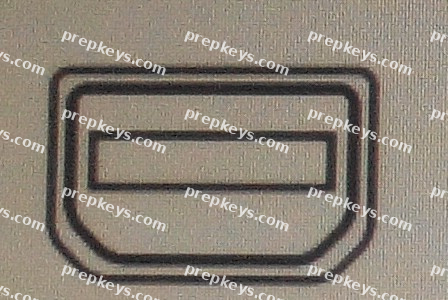
Examine the image. You have a cable with a connector of this shape.

What type of cable might this be? SELECT TWO.

A.

Thunderbolt

B.

Mini DisplayPort

C.

USB 2.0

D.

FireWire800

E.

Mini DVI

Showing 10 of 100 questions · Unlock the full set