Exit demo 9L0-415 OS X Support Essentials 10.9 PDF format · free preview

Apple 9L0-415 - Questions & Answers

Free preview · every answer includes a full explanation

Product page: https://prepkeys.com/9l0-415.html

Question 1
Single choice

Your Mac is started up from its OS X Recovery partition. You need to repair the hard disk.

Which procedure will let you perform the repair?

A.

Select Disk Utility in the OS X Utilities window, click Continue, select the hard disk, and click Repair Disk.

B.

In the OS X Utilities window, click Select Volume, click Continue, select the hard disk, and click Verify &
Repair.

C.

Quit the Recovery app, then open Disk Utility from the /Applications/Utilities/ folder on the OS X Recovery partition, select the hard disk, and click Repair Disk.

D.

Quit the Recovery app, then open Disk Utility from the /Applications/Utilities/ folder on the Macintosh HD partition, select the hard disk, and click Repair Disk.

Question 2
Single choice

Which OS X startup keyboard shortcut causes the system to display the most detailed information about the startup process?

A.

Command-S

B.

Shift

C.

F12

D.

Command-V

Question 3
Single choice

If you use the Get Info window to change Sharing & Permissions settings on a file or folder, Finder preserves and can revert to the previous settings until the window is closed.

A.

True

B.

False

Question 4
Single choice

Which OS X Mountain Lion tool can help you create a strong password?

A.

Password Audit, accessible from Security preferences

B.

Password Assistant, accessible from Users & Groups preferences

C.

Security Audit, accessible from Directory Utility

D.

Password Checking, accessible from Parental Controls preferences

Question 5
Single choice

Why might you prefer to shut down and then start up a Mac you are troubleshooting, rather than simply selecting Restart from the Apple menu?

A.

Because OS X loads a clean user session on startup only after a shutdown.

B.

Because OS X archives errors from the session to the log only during a shutdown.

C.

Because OS X performs disk checks on startup only after a shutdown.

D.

Because the Mac does a full POST on startup only after a shutdown.

Question 6
Single choice

Which steps will let you retrieve a file from a Time Machine backup on an external hard disk connected to your Mac?

A.

Open Time Machine, use the timeline to reach the appropriate date and time, select the file, and click Restore.

B.

In the Finder enter a search term in the Spotlight search field, click the Add (+) button to add a search criterion, and choose Search Time Machine, then use the timeline to reach the appropriate date and time, select the file, and click Restore.

C.

Open System Preferences, click the Time Machine icon, click Retrieve, use the timeline to reach the appropriate date and time, select the file, and click Restore.

D.

Control-click the icon of the folder in which you want the restored file to appear, open Time Machine from the shortcut menu, choose Restore from the Time Machine menu, use the timeline to reach the appropriate date and time, select the file, and click Restore.

Question 7
Single choice

You have configured several network locations on your OS X Mountain Lion computer.

How can you change from one location to another?

A.

In Network preferences, click Advanced, click Manage Locations, and then select a network location.

B.

Choose a network location from the Network Locations Input menu on the right side of the Finder menu bar.

C.

Choose Location from the Apple menu, and then choose a network location from the submenu.

D.

In Network preferences, choose Manage Locations from the Action pop-up menu below the Interfaces list, and select a network location.

Question 8
Single choice

You have a user account on an OS X Mountain Lion computer that has multiple user accounts.

How can you interact with another user's Dropbox folder that has default permissions?

A.

You can see its contents, but you cannot add files to it.

B.

You can neither see its contents nor add files to it.

C.

You cannot see its contents, but you can add files to it.

D.

You can see its contents and you can add files to it.

Question 9
Single choice

How do you start up an OS X Mountain Lion computer in Safe Mode?

A.

Hold down Shift during startup.

B.

Open Terminal, type safe_boot, press Return, and then restart the Mac.

C.

Hold down Command-Option-P-R during startup.

D.

Start up from the OS X Recovery partition, and then choose Safe Boot from the Startup Disk menu.

Question 10
Single choice

Review the screenshot from FileVault preferences, and then answer the question below.
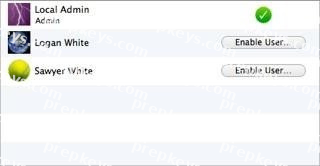
If you click Enable User for the Logan White account, what is the effect?

A.

FileVault 2 is enabled immediately for the Logan White account, and FileVault begins encrypting the Logan White home folder.

B.

You are prompted immediately to enter the login password for the Logan White account, after which, Logan White will be able to unlock and decrypt the system disk, and restart the computer.

C.

You are prompted immediately to enter an administrator password, after which, the user of the Logan White account will be able to unlock and decrypt the system disk, and restart the computer.

D.

At next login, the user of the Logan White account will be prompted to enter the login password, after which, the user will be able to unlock and decrypt the system disk, and restart the computer.

Showing 10 of 218 questions · Unlock the full set