Exit demo 9L0-420 Mac Integration Basics 10.10 Exam PDF format · free preview

Apple 9L0-420 - Questions & Answers

Free preview · every answer includes a full explanation

Product page: https://prepkeys.com/9l0-420.html

Question 1
Single choice

Where can Time Machine store backup files?

A.

DVD-R disc

B.

Internal startup volume

C.

External FireWire hard disk

D.

iCloud

Question 2
Single choice

Review the screenshot, then answer the question below.
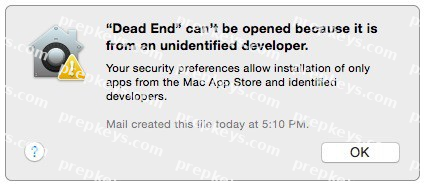
You try to open an application called Dead End, but you get the alert shown above. You know the application comes from a trusted source.

How can you open the Dead End application?

A.

Open Security & Privacy preferences, click the Gatekeeper tab, click the Add (+) button beneath the Authorized Applications list, and enter Dead End.

B.

Control-click the application, choose Open from the shortcut menu, then click Open in the dialog that appears.

C.

Option-click the application.

D.

Open Security & Privacy preferences, click the Gatekeeper tab, click the Add (+) button beneath the Developers list, and enter Houdini.

Question 3
Single choice

You've installed Boot Camp and Windows on your Mac.

Which Windows tool can you use to set up the Mac to start up in OS X by default?

A.

Boot Camp Wizard

B.

Mac OS Startup utility

C.

Windows Startup control panel

D.

Windows Boot Camp control panel

Question 4
Single choice

You connected a new USB hard drive to your Mac.

Which action will configure Time Machine to back up your data to the USB drive?

A.

Dragging the USB hard disk icon from the desktop onto the Time Machine icon in the Dock.

B.

Dragging the USB hard disk icon from the desktop onto the Time Machine icon in the /Applications/
Utilities/ folder.

C.

Clicking Time Machine in System Preferences, then clicking Select Backup Disk, selecting the USB hard disk, and clicking "Use Disk."

D.

Clicking the Time Machine icon in the Dock, selecting the new USB hard disk as the backup destination, choosing ZIP from the Backup Format list, and clicking Start.

Question 5
Single choice

Review the screenshot then answer the question below.
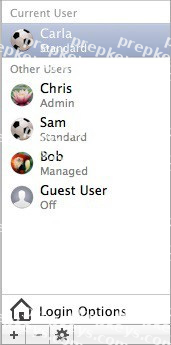
You have a Mac with the user accounts shown in the screenshot.
To configure the Mac to connect to an Active Directory server, you must authenticate as which user?

A.

Chris

B.

Carla

C.

Sam

D.

Bob

Question 6
Single choice

Which of these tasks can you accomplish using the SMB protocol?

A.

Provide Windows users access to shared files

B.

Share screens between Mac users

C.

Establish video conferences between users of the Messages application

D.

Send email messages from Windows computers

Question 7
Single choice

What is the role of POP in email transactions?

A.

POP translates IP addresses into domain names, and vice versa.

B.

POP lets mail clients retrieve email from the mail server.

C.

POP transfers outgoing email from the sender's mail server to the recipient's mail server.

D.

POP provides user account information, including the email address associated with a particular user account.

Question 8
Single choice

Which password was generated by choosing Letters & Numbers from the Type menu in Password Assistant?

A.

tend13)fuser

B.

htb3RL492QuB

C.

210691077647

D.

}\B'h9QadW{.

Question 9
Single choice

In OS X, which of these can you use to set a firmware password?

A.

The Security & Privacy pane of System Preferences

B.

The Firmware Password utility on the Recovery partition

C.

The Firmware Password utility in /System/Library/CoreServices/
D. The Users & Groups pane of System Preferences

Question 10
Single choice

In the context of computers on a network, what does "bind" mean?

A.

To configure a computer to connect to a directory server

B.

To configure a computer to prevent it from accessing data on the network

C.

To configure a firewall on a computer to restrict inbound traffic

D.

To configure a computer to connect to a network

Showing 10 of 46 questions · Unlock the full set