Microsoft MS-202 - Questions & Answers
Free preview · every answer includes a full explanation
Product page: https://prepkeys.com/ms-202.html
You need to recommend a deployment plan that meets the technical requirements for the mailbox databases.
What should you include in the recommendation?
Deploy 10 Exchange servers to the main office and one Exchange server to each branch office. Create two mailbox databases on each server.
Deploy one Exchange server to each office. Create two mailbox databases on each server. Create copies of the databases on another server.
Deploy 11 Exchange servers to the main office and one Exchange server to each branch office. Create one mailbox database on each server.
Deploy one Exchange server to the main office and two Exchange servers to each branch office.
Create one mailbox database on each server.
You need to recommend a solution to meet the technical requirements for the managers.
What should you recommend creating for the mailboxes of the managers?
a transport agent
a separate Exchange server
a separate mailbox database
an audit policy
You need to recommend a load balancing solution for the client connections that must be created to meet the disaster recovery requirements.
What should you recommend?
Deploy a Layer 7 load balancing solution.
Deploy a Layer 4 load balancing solution.
Implement Network Load Balancing (NLB) on each Exchange server.
Implement DNS load balancing for all the Exchange-related DNS records and implement round robin for DNS name resolution.
https://docs.microsoft.com/en-us/exchange/architecture/client-access/loadbalancing?view=exchserver-2019
You need to configure a mail flow solution for email that will be sent from each branch office to the Internet.
The solution must meet the technical requirements.
What is the best way to achieve the goal? More than one answer choice may achieve the goal. Select the BEST answer.
a Send connector in the main office that has a cost of 100 and uses a Mailbox server in each office as an SMTP smart host
a Send connector in each office that each has the default costs
two Send connectors in the main office that both have the default costs.
a Send connector in each branch office that has a cost of 100 and uses a Mailbox server in the main office as an SMTP smart host
You need to implement a routing solution that meets the technical requirements.
What should you do?
In each office, create a scoped Send connector.
Create an SMTP site link for each office.
Configure the main office as an Active Directory hub site.
Create 10 accepted domains.
HOTSPOT
After you deploy the Exchange organization, you run the Get-ActiveSyncDeviceAccessRule cmdlet, and you receive the following output.
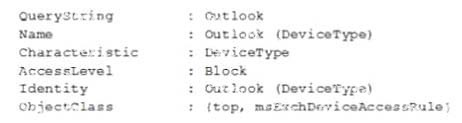
For each of the following statements, select Yes if the statement is true. Otherwise, select No.
NOTE: Each correct selection is worth one point.
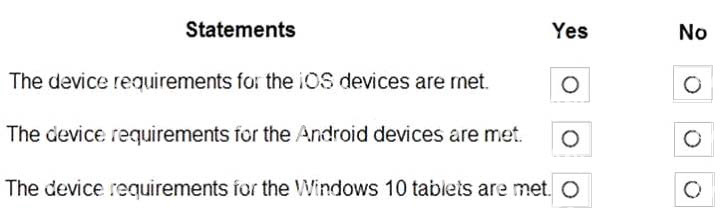
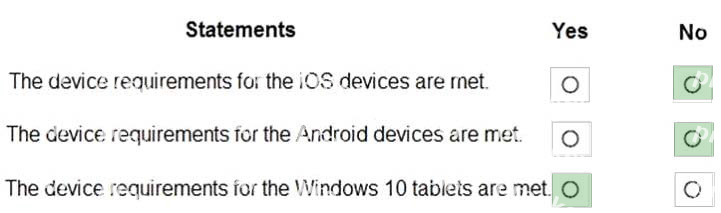
The rule is incorrectly configured so nothing will be blocked. The QueryString parameter specifies the device identifier that's used by the rule, not the software.
HOTSPOT
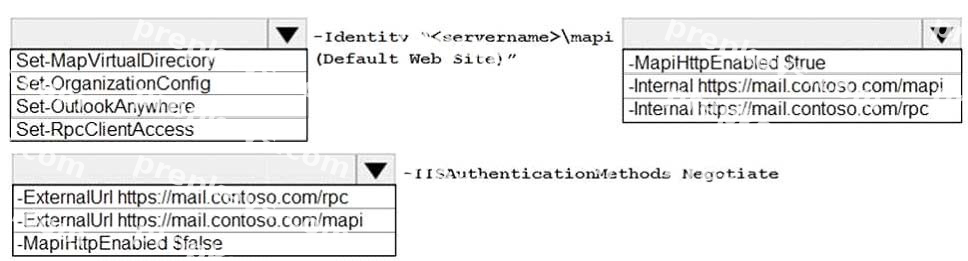
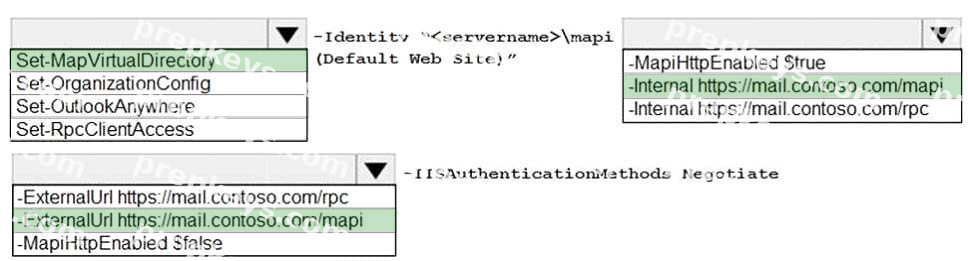
You need to configure the virtual directories to meet the technical requirements.
How should you complete the command? To answer, select the appropriate options in the answer area;
NOTE: Each correct selection is worth one point.
Testlet 1
CastStudy 2
Manage mail flow topology
Overview
This is a case study. Case studies are not timed separately. You can use as much exam time as you would like to complete each case. However, there may be additional case studies and sections on this exam. You must manage your time to ensure that you are able to complete all questions included on this exam in the time provided.
To answer the questions included in a case study, you will need to reference information that is provided in the case study. Case studies might contain exhibits and other resources that provide more information about the scenario that is described in the case study. Each question is independent of the other questions in this case study.
At the end of this case study, a review screen will appear. This screen allows you to review your answers and to make changes before you move to the next section of the exam. After you begin a new section, you cannot return to this section.
To start the case study
To display the first question in this case study, click the Next button. Use the buttons in the left pane to explore the content of the case study before you answer the questions. Clicking these buttons displays information such as business requirements, existing environment, and problem statements. If the case study has an All Information tab, note that the information displayed is identical to the information displayed on the subsequent tabs. When you are ready to answer a question, click the Question button to return to the question.
General Overview
Contoso, Ltd is a company that has retail stores throughout Europe and North America. Contoso has 5,000 employees worldwide.
Contoso has a main office in London. The company has 10 branch offices. In each office, there are 50 managers. There are 100 retail stores in Europe and North America. Each retail store has between five and 20 employees.
Network Infrastructure
Contoso has a data center in each office. All the offices connect to each other by using redundant WAN links. Each office has a high-speed connection to the Internet.
The network contains an Active Directory forest named contoso.com.
All users sign in to their computer by using an Active Directory user account.
Each office contains at least two domain controllers from the contoso.com domain. Each office is configured as an Active Directory site. Each branch office has one site link to the main office.
Planned Changes
Contoso has a legacy mail application. The company plans to replace the application with a Microsoft Exchange Server 2019 organization.
In Exchange Server 2019, all recipients will have an email address that uses a format of [email protected].
Requirements
Technical Requirements
Contoso has the following technical requirements: All mailboxes must be protected by storing one copy in a branch office and another copy in the main office.
For the mailboxes in the London office, a copy must be created in a branch office in Birmingham.
All email sent to external recipients must be delivered by using a local connection to the Internet. If the local connection becomes unavailable, the Internet connection in the main office must be used.
All users will connect to the mailbox by using Microsoft Outlook 2019. All client connections must be established to a namespace of mail.contoso.com.
All client connection must be established to a server in the local office, unless that server becomes unavailable.
The mailboxes of managers must be backed up twice daily. All other mailboxes must be backed up weekly.
All email sent between the users in different offices must be routed through the main office.
Whenever possible, administrative effort must be minimized.
Whenever possible, costs must be minimized.
Disaster Recovery Requirements
Contoso has the following disaster recovery requirements:
All users must be redirected automatically to another Mailbox server if a single Mailbox server fails.
All users must be redirected automatically to another Mailbox server if a single Exchange server fails.
Users who connect to their mailbox by using an Android device must be prevented from using the Outlook app.
Users who connect to their mailbox by using an iOS device must be prevented from using the Outlook app.
Users who connect to their mailbox by using a Windows 10 tablet must be able to use Outlook 2019.
You need to implement a routing solution that meets the technical requirements.
What should you do?
Configure the main office as an Active Directory hub site.
Create 10 accepted domains.
Create an SMTP site link for each office.
In each office, create a scoped Send connector.
Testlet 1
CastStudy 3
Manage mail flow topology
Overview
This is a case study. Case studies are not timed separately. You can use as much exam time as you would like to complete each case. However, there may be additional case studies and sections on this exam. You must manage your time to ensure that you are able to complete all questions included on this exam in the time provided.
To answer the questions included in a case study, you will need to reference information that is provided in the case study. Case studies might contain exhibits and other resources that provide more information about the scenario that is described in the case study. Each question is independent of the other questions in this case study.
At the end of this case study, a review screen will appear. This screen allows you to review your answers and to make changes before you move to the next section of the exam. After you begin a new section, you cannot return to this section.
To start the case study
To display the first question in this case study, click the Next button. Use the buttons in the left pane to explore the content of the case study before you answer the questions. Clicking these buttons displays information such as business requirements, existing environment, and problem statements. If the case study has an All Information tab, note that the information displayed is identical to the information displayed on the subsequent tabs. When you are ready to answer a question, click the Question button to return to the question.
General Overview
Contoso, Ltd is a national freight company in the United States. The company has 15,000 employees.
Physical Location
Contoso has a main office in Houston and 10 branch offices that each contains 1,000 employees.
Existing Environment
Active Directory and Microsoft Exchange Server Environments
The network contains an Active Directory forest named contoso.com. The forest contains one root domain named contoso.com and 10 child domains. All domain controllers run Windows Server 2019.
The forest has Active Directory Certificate (AD CS) and Active Directory Federation Services (AD FS) deployed.
You have a hybrid deployment of Exchange Server 2019 and Microsoft Office 365.
There are 2,000 user mailboxes in Exchange Online.
Each office contains two domain controllers and two Mailbox servers. The main office also contains an Edge Transport server.
The organization contains 100 public folders. The folders contain 80 GB of content.
All email messages sent to contoso.com are delivered to Exchange Online. All messages sent to on-premises mailboxes are routed through the Edge Transport server.
Advanced Threat Protection (ATP) is enabled and configured for the office 365 tenant.
Network Infrastructure
Each office connects directly to the Internet by using a local connection. The offices connect to each other by using a WAN link.
Requirements
Planned Changes
Contoso plans to implement the following changes: For all new users in the on-premises organization, provide an email address that uses the value of the Last Name attribute and the first two letters of the First Name attribute as a prefix.
Decommission the public folders and replace the folders with a Microsoft 365 solution that maintains web access to the content.
Technical Requirements
Contoso identifies the following technical requirements: All email messages sent from an SMTP domain named adatum.com must never be identified as spam.
Any solution to replace the public folders must include the ability to collaborate with shared calendars.
Security Requirements
Contoso identifies the following security requirements:
The principle of least privilege must be applied to all users and permissions.
All email messages sent from an SMTP domain named fabrikam.com to contoso.com must be encrypted.
All users must be protected from accessing unsecure websites when they click on URLs embedded in email messages.
If a user attempts to send an email message to a distribution group that contains more than 15 members by using Outlook, the user must receive a warning before sending the message.
Problem Statements
Recently, a user named HelpdeskUser1 erroneously created several mailboxes. Helpdesk1User1 is a member of the recipient Management role group.
Users who have a mailbox in Office 365 report that it takes a long time for email messages containing attachments to be delivered.
Exhibit
You configure a connector as shown in the following exhibit.
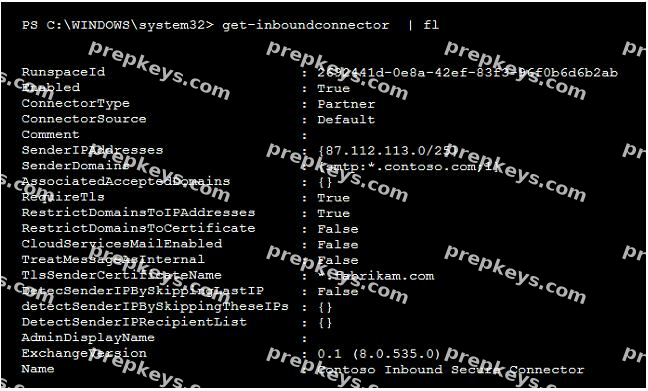
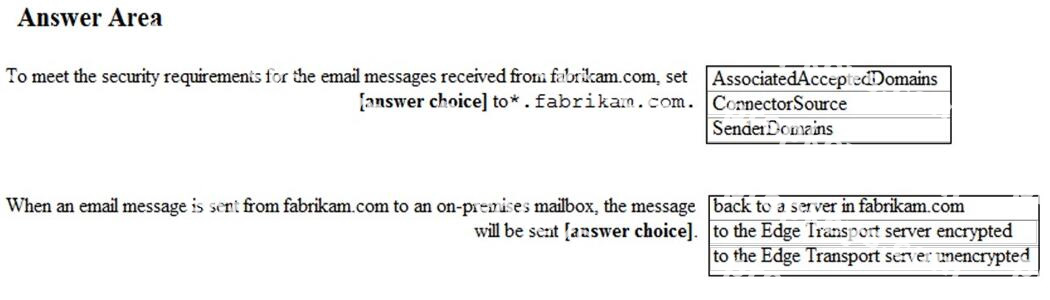
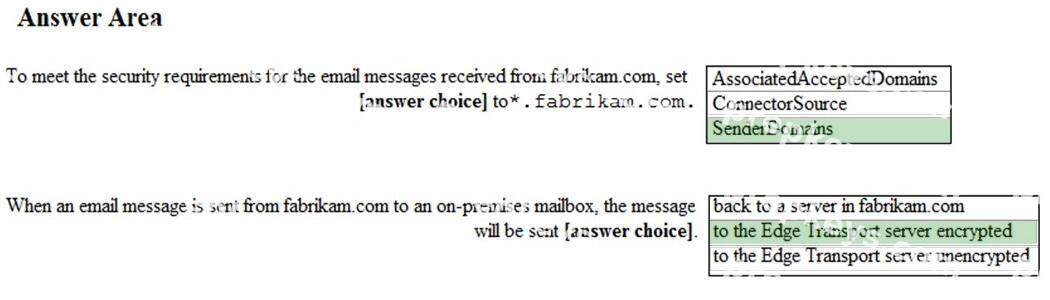
HOTSPOT
Use the drop-down menus to select the answer choice that completes each statement based on the information presented in the graphic.
NOTE: Each correct selection is worth one point.
Testlet 1
CastStudy 4
Secure the messaging enviroment
Overview
This is a case study. Case studies are not timed separately. You can use as much exam time as you would like to complete each case. However, there may be additional case studies and sections on this exam. You must manage your time to ensure that you are able to complete all questions included on this exam in the time provided.
To answer the questions included in a case study, you will need to reference information that is provided in the case study. Case studies might contain exhibits and other resources that provide more information about the scenario that is described in the case study. Each question is independent of the other questions in this case study.
At the end of this case study, a review screen will appear. This screen allows you to review your answers and to make changes before you move to the next section of the exam. After you begin a new section, you cannot return to this section.
To start the case study
To display the first question in this case study, click the Next button. Use the buttons in the left pane to explore the content of the case study before you answer the questions. Clicking these buttons displays information such as business requirements, existing environment, and problem statements. If the case study has an All Information tab, note that the information displayed is identical to the information displayed on the subsequent tabs. When you are ready to answer a question, click the Question button to return to the question.
General Overview
Litware, Inc. is a food service supplier in Europe.
Physical Locations
Litware has a main office in Paris and branch offices in Munich, London, Brussels, Vienna, and Rome.
Each branch office has its own compliance officer.
Existing Environment
Active Directory Environment
The network contains an Active Directory forest named litware.com. The forest contains a single Active Directory domain. Each office is configured as an Active Directory site.
Each branch office is represented as a separate organizational unit (OU) in an OU named Offices in Active Directory.
Each branch office has a special Administrators group that contains the delegated administrators for that office. Each Administrators group is named based on its location in a format of RegionalAdmins_Brussels, RegionalAdmins_Munich, RegionalAdmins_London, RegionalAdmins_Vienna and RegionalAdmins_Rome.
Network Infrastructure
Each office contains two domain controllers from the litware.com domain. All the domain controllers are configured as DNS servers. All client computers connect only to the DNS servers in their respective office.
All offices have a high-speed connection to the Internet. Each office connects to the Internet by using a
VPN appliance.
Each office has the following servers and client computers:
One reverse proxy appliance
One Microsoft exchange Server 2019 server
One Windows Server Update Services (WSUS) server
Computers that run Windows 10 and have Microsoft Office 2019 installed
The office in Brussels contains an Exchange Server 2016 server that has the Unified Messaging role installed and hosted voicemail configured.
Mailboxes are hosted on all the Exchange servers. Public folders are hosted only on an Exchange server in the main office. Litware uses a disjointed namespace to access the servers.
Each user has an archive mailbox. Archiving is configured to use the default settings.
Exchange services are published to the Internet by using a reverse proxy in each office.
A full backup of Exchange is performed nightly. Incremental backups occur every six hours.
All the users in the transport department connect to network resources by using a connection in the main office.
Requirements
Planned Changes
Litware plans to implement the following changes: Implement calendar to partner companies.
Implement a solution that prevents malware from being delivered to end users.
Use personal archives to eliminate the need for PST files.
Ensure that a helpdesk user in each office can configure the properties of the mailboxes in their office only Close the Brussels office and move all the users in the Brussels office to the main office. All the mailboxes in the Brussels office will be moved to a server in the main office.
Implement a compliance solution to ensure that items deleted from public folders are retained. If an item in a public folder is modified, the original version of the item must be available.
Technical Requirements
Litware identifies the following technical requirements:
Minimize administrative effort
Use the principle of least privilege Ensure that junk email is deleted automatically after 14 days.
Ensure that sent items are deleted automatically after 30 days.
Ensure that users in the customer service department can open multiple mailboxes.
Ensure that all the former Brussels office users always maintain access to hosted voicemail.
Ensure that the staff in the IT department can manage the email environment without end-user involvement.
Ensure that users cannot recover email messages that are deleted from the Junk Email folder and the Deleted Items.
Ensure that if an email message has a spam confidence level (SCL) of 3 or higher, the message automatically moves to the Junk Email folder.
Problem Statements
The transport department users report that accessing a public folder named TransportPF is sometimes very slow.
Users in the customer service department report that Microsoft Outlook sometimes hangs when many mailboxes are open.
You need to recommend a solution to retain the items in the public folders. The solution must support the planned changes.
What should you recommend?
Increase the frequency of the backups.
Place an In-Place Hold on all the mailboxes of the public folders.
Create an Outlook rule that forwards all the items in each public folder to a compliance mailbox.
Modify the public folder permissions.
https://docs.microsoft.com/en-us/exchange/security-and-compliance/in-place-and-litigationholds#placingpublic-folders-on-hold
Showing 10 of 160 questions · Unlock the full set