Fortinet NSE7_PBC-7.2 - Questions & Answers
Free preview · every answer includes a full explanation
Product page: https://prepkeys.com/nse7-pbc-72.html
Your goal is to deploy resources in multiple places and regions in the public cloud using Terraform.
What is the most efficient way to deploy resources without changing much of the Terraform code?
Use multiple terraform.tfvars files With a variables.tf file.
Use the provider. tf file to add all the new values
Install and configure two Terraform staging servers to deploy resources.
Use the variable, tf file and edit its values to match multiple resources
When deploying resources in multiple places and regions in the public cloud using Terraform, the most efficient way is: A.Use multiple terraform.tfvars files with a variables.tf file. Terraform.tfvars File:This file is used to assign values to variables defined in your Terraform configuration. By having multiple.tfvarsfiles, you can define different sets of values for different deployments, such as for different regions or environments, without changing the main configuration.
Variables.tf File:This file contains the definition of variables that will be used within your Terraform configuration. It works in conjunction withterraform.tfvarsfiles, allowing you to parameterize your configuration so that you can deploy the same template in multiple environments with different variables.
References:
This method is outlined in Terraform's official documentation and is a best practice for reusing
code for different environments in infrastructure as code (IaC) deployments.
An administrator decides to use the Use managed identity option on the FortiGate SDN connector with Microsoft Azure However, the SDN connector is failing on the connection.
What must the administrator do to correct this issue?
Make sure to add the Tenant ID on FortiGate side of the configuration
Make sure to set the type to system managed identity on FortiGate SDN connectorsettings
Make sure to enable the system assigned managed identity on Azure
Make sure to add the Client secret on FortiGate side of the configuration
When an administrator decides to use the 'Use managed identity' option for the FortiGate SDN connector with Microsoft Azure and faces a connection failure, the correct action to take is: C.Make sure to enable the system assigned managed identity on Azure. Managed Identity Configuration:The system assigned managed identity is a feature in Azure that provides an identity for the Azure service instance (in this case, the FortiGate SDN connector) within Azure Active Directory and eliminates the need for credentials to be stored in the configuration. Troubleshooting Connection Issues:If the SDN connector is failing to connect, it could be because the system assigned managed identity has not been enabled or configured properly in Azure for the FortiGate service.
References:
Azure documentation on managed identities explains the need to enable and configure this feature for services to authenticate and interact securely with Azure resources.
You are adding more spoke VPCs to an existing hub and spoke topology Your goal is to finish this task in the minimum amount of time without making errors.
Which Amazon AWS services must you subscribe to accomplish your goal?
GuardDuty, CloudWatch
WAF, DynamoDB
Inspector, S3
CloudWatch, S3
The correct answer is D. CloudWatch and S3. According to the GitHub repository for the Fortinet aws-lambda-tgw script1, this function requires the following AWS services: CloudWatch: A monitoring and observability service that collects and processes events from various AWS resources, including Transit Gateway attachments and route tables.
S3: A scalable object storage service that can store the configuration files and logs generated by the Lambda function.
By using the Fortinet aws-lambda-tgw script, you can automate the creation and configuration of Transit Gateway Connect attachments for your FortiGate devices.This can help you save time and avoid errors when adding more spoke VPCs to an existing hub and spoke topology.
The other AWS services mentioned in the options are not required for this task. GuardDuty is a threat detection service that monitors for malicious and unauthorized behavior to help protect AWS accounts and workloads. WAF is a web application firewall that helps protect web applications from common web exploits. Inspector is a security assessment service that helps improve the security and compliance of applications deployed on AWS. DynamoDB is a fast and flexible NoSQL database service that can store various types of data.GitHub - fortinet/aws-lambda-tgw
Refer to the exhibit.
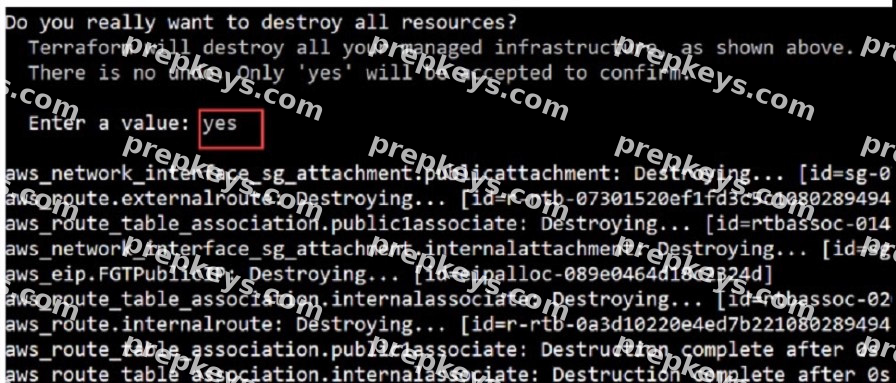
What would be the impact of confirming to delete all the resources in Terraform?
It destroys all the resources in the . tfvars file
It destroys all the resources tied to the AWS Identity and Access Management (1AM) user.
It destroys all the resources in the resource group
It destroys all the resources in the state file.
Confirming to delete all the resources in Terraform will have the following impact: D.It destroys all the resources in the state file. Terraform State File Role:Theterraform.tfstatefile contains a real-time mapping of the resources that Terraform manages, including their current configuration and relationships. This file tracks the actual state of resources provisioned by Terraform.
Impact of Destruction:When Terraform prompts for confirmation to destroy resources, and 'yes' is entered, Terraform reads the state file and systematically removes all the resources that are managed as part of that state. This is not limited to a specific .tfvars file, IAM user, or resource group--it is a global action that affects all resources tracked by the state file associated with the current Terraform workspace and configuration.
References:
The function of theterraform.tfstatefile and the impact of resource destruction are detailed in
Terraform's official documentation. This behavior is fundamental to how Terraform manages infrastructure as code.
You are automating configuration changes on one of the FortiGate VMS using Linux Red Hat Ansible.
How does Linux Red Hat Ansible connect to FortiGate to make the configuration change?
It uses a FortiGate internal or external IP address with TCP port 21
It uses SSH as a connection method to FortiOS.
It uses an API.
It uses YAML
Ansible connects to FortiGate using an API, which is a method of communication between different software components. Ansible uses the fortios_* modules to interact with the FortiOS API, which is a RESTful API that allows configuration and monitoring of FortiGate devices. Ansible can use either HTTP or HTTPS as the transport protocol, and can authenticate with either a username and password or an API token.
The other options are incorrect because: Ansible does not use TCP port 21 to connect to FortiGate. Port 21 is typically used for FTP, which is not supported by FortiOS.
Ansible does not use SSH as a connection method to FortiOS. SSH is a secure shell protocol that allows remote command execution and file transfer, but it is not the preferred way of automating configuration changes on FortiGate devices. Ansible does not use YAML to connect to FortiGate. YAML is a data serialization language that Ansible uses to write playbooks and inventory files, but it is not a connection method.
References:
Fortinet.Fortios -- Ansible Documentation FortiOS REST API Reference FortiOS Module Guide -- Ansible Documentation FortiOS 7.0 CLI Reference
[Connection methods and details -- Ansible Documentation] [YAML Syntax -- Ansible Documentation]
Refer to the exhibit
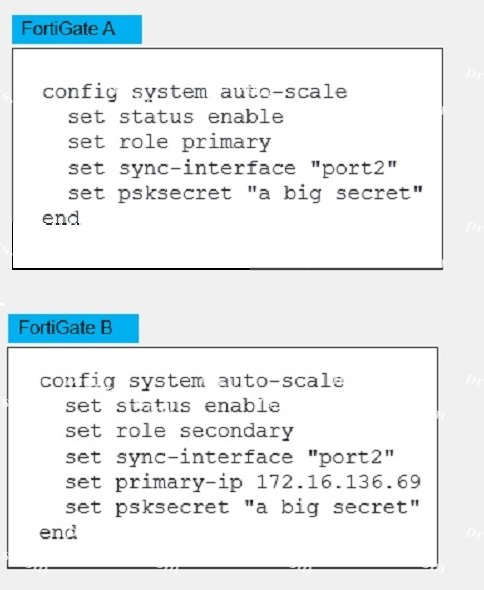
An administrator deployed an HA active-active load balance sandwich in Microsoft Azure. The setup
requires configuration synchronization between devices-
What are two outcomes from the configured settings? (Choose two.)
FortiGate-VM instances are scaled out automatically according to predefined workload levels.
FortiGate A and FortiGate B are two independent devices.
By default, FortiGate uses FGCP
It does not synchronize the FortiGate hostname
B. FortiGate A and FortiGate B are two independent devices. This means that they are not part of a cluster
or a high availability group, and they do not share the same configuration or state information. They are configured as standalone FortiGates with standalone configuration synchronization enabled. This feature allows them to synchronize most of their configuration settings with each other, except for some settings that identify the FortiGate to the network, such as the hostname. D. It does not synchronize the FortiGate hostname. This is one of the settings that are excluded from the standalone configuration synchronization, as mentioned above. The hostname is a unique identifier for each FortiGate device, and it should not be changed by the synchronization process.
The other options are incorrect because: FortiGate-VM instances are not scaled out automatically according to predefined workload levels. This is a feature of the auto scaling solution for FortiGate-VM on Azure, which requires a different deployment and configuration than the one shown in the exhibit. The exhibit shows a static deployment of two FortiGate-VM instances behind an Azure load balancer, which does not support auto scaling. By default, FortiGate does not use FGCP. FGCP stands for FortiGate Clustering Protocol, which is used to synchronize configuration and state information between FortiGate devices in a cluster or a high availability group. However, the exhibit shows that the FortiGates are not in a cluster or a high availability group, and they use standalone configuration synchronization instead of FGCP.
Refer to the exhibit.
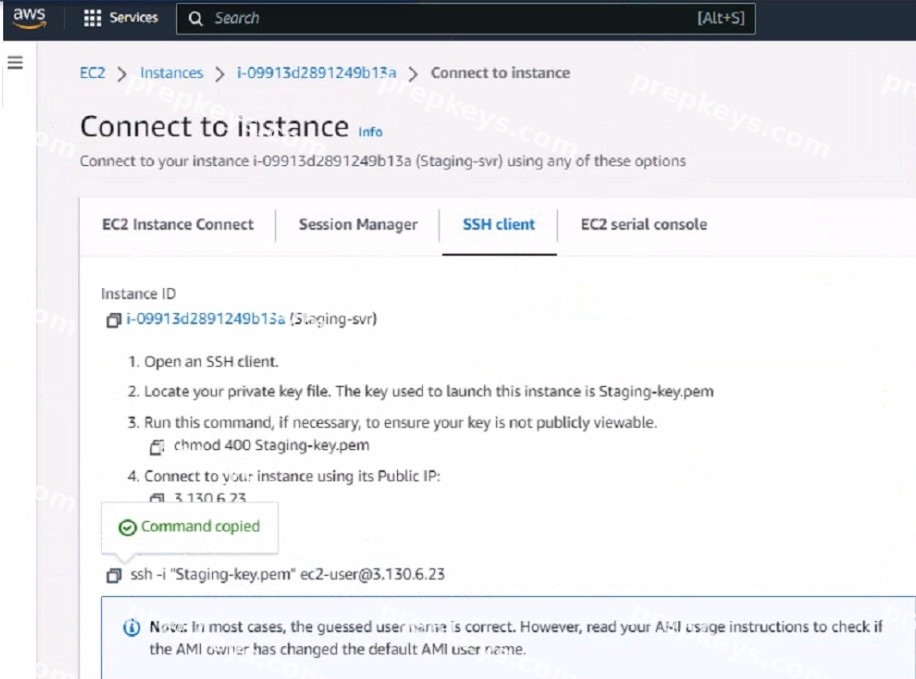
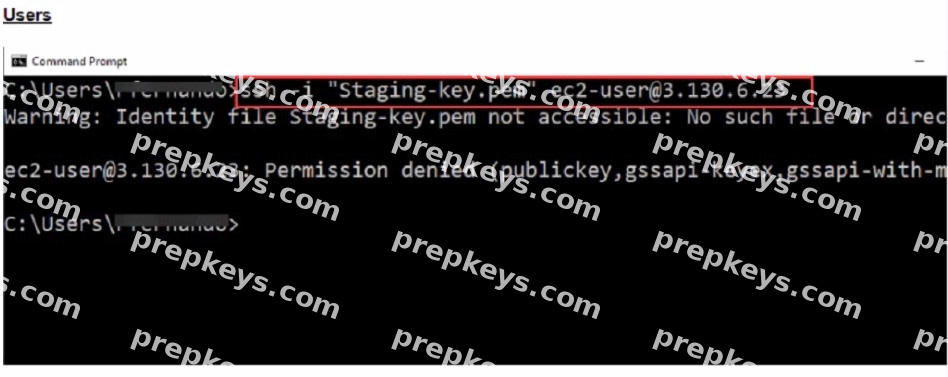
What could be the reason that the administrator cannot access the EC2 instance?
You must elevate the permissions to access the EC2 instance
You must run the chmod 400 Staging-key.peracommand before accessing the instance.
There is no . pem key created on in Amazon Web Services (AWS)
The directory location of the . pem file is incorrect.
The reason the administrator cannot access the EC2 instance could be: D.The directory location of the .pem file is incorrect. SSH Key Location:When initiating an SSH connection to an AWS EC2 instance, you must specify the private key file (.pem file) location that corresponds to the public key used when the instance was launched. The error "Warning: Identity file Staging-key.pem not accessible: No such file or directory" indicates that the SSH client cannot find the .pem file at the specified location. Correct File Path:The administrator needs to ensure that the path to theStaging-key.pemfile is correctly specified when running the SSH command. If the file is not in the current directory from which the command is executed, the full or relative path to the file must be provided.
References:
This behavior is in line with standard SSH connection practices and AWS guidelines for
accessing EC2 instances. It is a common issue that occurs when the private key file is not located in the directory from which the SSH command is being executed or the path provided is incorrect.
Refer to the exhibit.
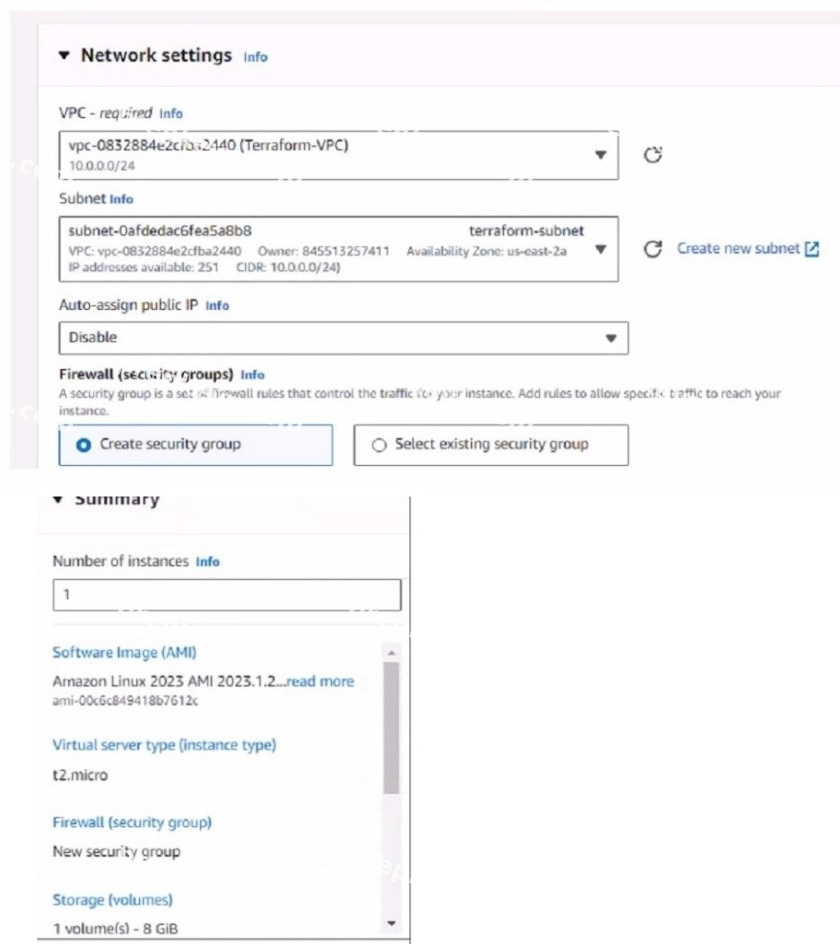
You have deployed a Linux EC2 instance in Amazon Web Services (AWS) with the settings shown on the exhibit
What next step must the administrator take to access this instance from the internet?
Configure the user name and password.
Enable source and destination checks on the instance
Enable SSH and allocate it to the device
Allocate an Elastic IP address and assign it to the instance
The next step the administrator must take to access the Linux EC2 instance from the internet is: D.Allocate an Elastic IP address and assign it to the instance. Elastic IP (EIP) Requirement:By default, when an EC2 instance is launched in AWS, it receives a public IP address from Amazon's pool, which is not static. This IP address can change, for example, if the instance is stopped and started again. To have a static IP address, you need to allocate an Elastic IP (EIP), which is a persistent public IP address, and then associate it with the instance. Public Accessibility:Without an Elastic IP, the instance may not be accessible over the internet after a reboot or stop/start sequence. Assigning an Elastic IP ensures the instance can be accessed consistently using the same IP address.
References:
The AWS documentation on EC2 instances details the process and need for Elastic IPs to ensure consistent internet access to instances.
How does Terraform keep track of provisioned resources?
It uses the terraform. tf state file
Terraform does not keep the state of resources created
It uses the terraform. tfvars file.
It uses the database. tf file.
Terraform manages and tracks the state of infrastructure resources through a file known as terraform.tfstate. This file is automatically created by Terraform and is updated after the application of a Terraform plan to capture the current state of the resources. State File Purpose:Theterraform.tfstatefile contains a JSON object that records the IDs and properties of resources Terraform manages, so that it can map real-world resources to your configuration, keep track of metadata, and improve performance for large infrastructures.
State File Management:This file is crucial for Terraform to perform resource updates, deletions, and for creating dependencies. It's essentially the 'source of truth' for Terraform about your managed infrastructure and services.
References:
This behavior is documented in Terraform's official documentation, which explains how theterraform.tfstatefile is used to keep track of the infrastructure Terraform is managing.
What are two main features in Amazon Web Services (AWS) network access control lists (ACLs)? (Choose two.)
You cannot use Network ACL and Security Group at the same time.
The default network ACL is configured to allow all traffic
NetworkACLs are stateless, and inbound and outbound rules are used for traffic filtering
Network ACLs are tied to an instance
B. The default network ACL is configured to allow all traffic. This means that when you create a VPC, AWS
automatically creates a default network ACL for that VPC, and associates it with all the subnets in the VPC1. By default, the default network ACL allows all inbound and outbound IPv4 traffic and, if applicable, IPv6 traffic. You can modify the default network ACL, but you cannot delete it. C. Network ACLs are stateless, and inbound and outbound rules are used for traffic filtering. This means that network ACLs do not keep track of the traffic that they allow or deny, and they evaluate each packet separately. Therefore, you need to create both inbound and outbound rules for each type of traffic that you want to allow or deny.
For example, if you want to allow SSH traffic from a specific IP address to your subnet, you need to create an inbound rule to allow TCP port 22 from that IP address, and an outbound rule to allow TCP port 1024- 65535 (the ephemeral ports) to that IP address.
The other options are incorrect because: You can use network ACL and security group at the same time. Network ACL and security group are two different types of security layers for your VPC that can work together to control traffic. Network ACLacts as a firewall for your subnets, while security group acts as a firewall for your instances. You can use both of them to create a more granular and effective security policy for your VPC. Network ACLs are not tied to an instance. Network ACLs are associated with subnets, not instances. This means that network ACLs apply to all the instances in the subnets that they are associated with. You cannot associate a network ACL with a specific instance. However, you can associate a security group with a specific instance or multiple instances.
Showing 10 of 59 questions · Unlock the full set