QlikView QSSA2018 - Questions & Answers
Free preview · every answer includes a full explanation
Product page: https://prepkeys.com/qssa2018.html
A company decides to move servers from on premise to a cloud. A system administrator performs a backup, restore, and brings the server online. When users open the app on the hub, they get an error message indicating the app could not be found.
The system administrator confirms that apps are present in the required location and NO changes have been made.
What could be causing the issue?

Refer to the exhibit.
Qlik Sense Enterprise is deployed in a multi-node environment. The environment is separated into a central, a scheduler, and a consumer node. A system administrator routinely performs updates and validates that the system accepts the updates correctly. The system administrator notices that reloads of the License Monitor and Operations Monitor fail with this error message:
QVX_UNEXPECTED_END_OF_DATA: Failed to connect to server
What should the system administrator do to resolve this issue?
A single-node Qlik Sense environment has all services up and running. Users report apps and sheets are slow to open.
A system administrator works remotely and does NOT have access to the shared file system for the environment. The system administrator's computer can make requests to the Qlik Sense Repository Service. Due to the system performance issues, a system administrator can NOT run any new reloads.
The system administrator receives a warning email about high RAM usage on the server.
Which step should the system administrator take to troubleshoot this issue?
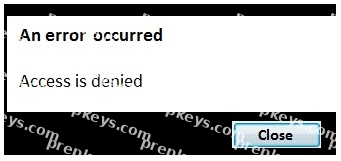
Refer to the exhibit.
A user from the HR department has access to the HR stream. The rule on the stream is:
((user.group!="Delivery" and user.group!="Account Manager" and user.userDirectory!="Externals"))
When the user tries to open the app in the HR stream, the error in the exhibit displays.
What is causing this error?
A system administrator creates a custom property called "dept" and assigns it to users and apps. The value of the custom property are department names such as Accounting, Finance, and IT. Users with the same value for "dept" can see and edit each other's apps. Users with different values for the property should NOT see each other's apps.
Which security rule should the administrator use to meet this requirement?
A user owns an app that was previously published and wants to delete the app in the hub. The user is NOT able to delete the app.
What could be causing this issue?
A security audit revealed problems with the newly installed multi-node environment. The environment was deployed using the default settings for the central and rim nodes. All possible services have been added to the rim node.
The audit was based on the current IT security policy when states: All traffic between servers should be encrypted 256-bit encryption is required Traffic between client and server should be encrypted and trusted iOS devices must be supported Password length must be at least eight characters and include at least one number and one special character
What should the system administrator deploy to meet these requirements?
A system administrator adds RIM B to a two-node environment using the central node as the proxy. The system administrator is using the default virtual proxy for the central node to access the hub.
The system administrator sets up a load balancing rule to have all apps served on both RIM A and RIM B.
The system administrator performs the following steps:
1. Disables the default load balancing rule, "ResourcesOnNonCentralNodes"
2. Creates a new rule with the Resource filter "App_*" and checks Load balancing
3. Sets the condition to ((node.name="RIM A" or node.name="RIM B"))
The rule is successfully verified. The system administrator has users log in to the hub and open apps to verify that they are opening on RIM B. However, after multiple users open the same app, there is still NO report of activity on RIM B.
What is causing this issue?
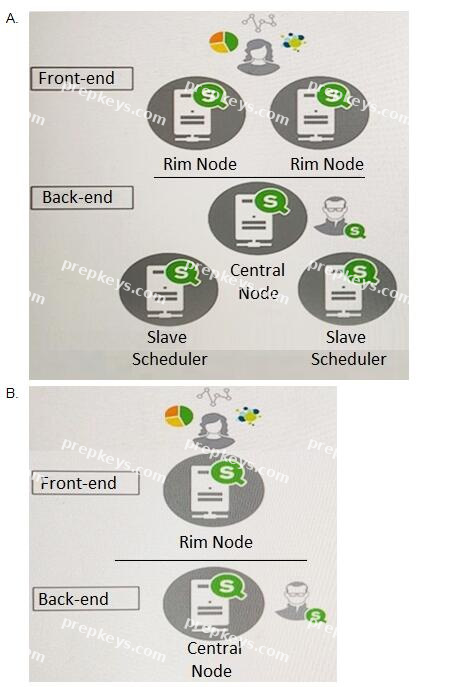
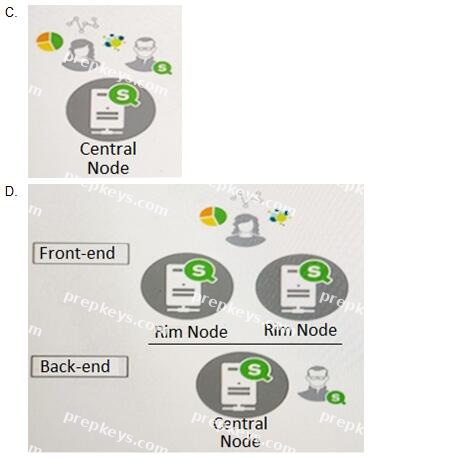
Refer to the exhibit.
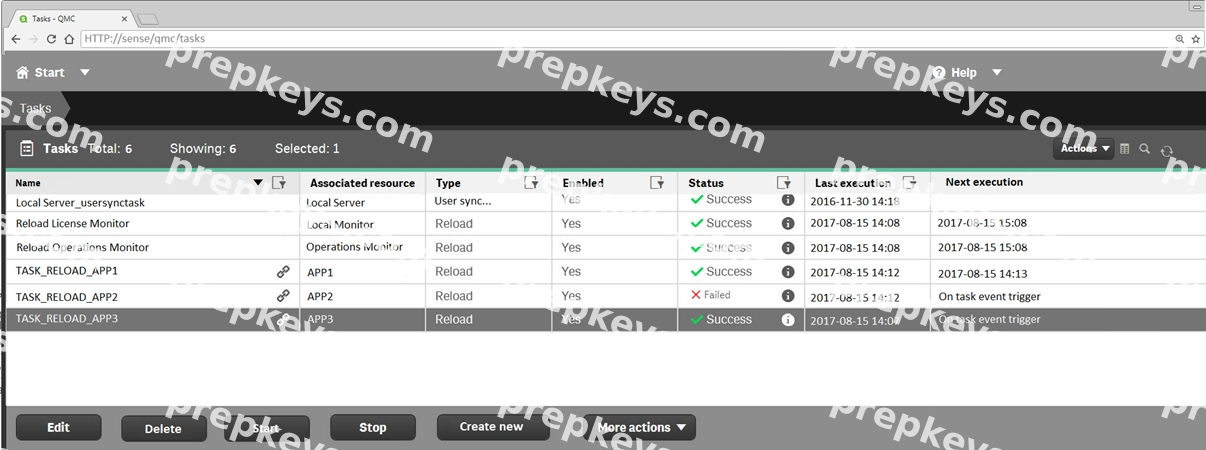
Refer to the exhibit.
A ContentAdmin user discovers TASK_RELOAD_APP2 fails. The user double-clicks the Failed task to open the Edit reload task screen. There are NO issues found in the Edit reload task screen. The user opens the Operations Monitor app, and finds an error message in the Task Details sheet:
Message from ReloadProvider: Reload failed in Engine. Check Engine or Script logs.
The Engine log did NOT provide any reason for the failure.
Which is the most efficient method to find the cause of this issue?
A system administrator must design a Qlik Sense server architecture that meets the following requirements: Approximately 1000 users will be using apps Apps are reloaded outside of office hours
The total size of data in all apps will be approximately 600 million rows Apps must be available 24/7
Which architecture meets these requirements in the most cost efficient way?