Talend TALEND-TDICD - Questions & Answers
Free preview · every answer includes a full explanation
Product page: https://prepkeys.com/talend-tdicd.html
You need to set up a server in your Talend environment that enables several members of your team to collaborate on a project.
Which application must you enable before working on a remote project?
Git or SVN server instance must be running.
Talent Administration Center instance must be running with the team members and project configured.
Git or SVN client must be installed on each developed workstation.
Talend admission Center service must be running on each development workstation.
To set up a server in your Talend environment that enables several members of your team to collaborate on a project, you need to enable two applications before working on a remote project: Git or SVN server instance and Talend Administration Center instance. These applications are used to manage version control and collaboration for your project.
Git or SVN server instance is a server application that allows you to store and track changes of your project files using a version control system. Git and SVN are two popular version control systems that are supported by Talend Studio. You need to have a Git or SVN server instance running and accessible by your team members before working on a remote project. You also need to have a Git or SVN client installed on each development workstation to connect to the server and perform version control operations. Talend Administration Center is a web-based application that allows you to manage users, projects, tasks, execution servers, and licenses for your Talend environment. You need to have a Talend Administration Center instance running and accessible by your team members before working on a remote project. You also need to configure the team members and project settings in Talend Administration Center to grant access and permissions for your project.
References:
Talend Open Studio: Open-source ETL and Free Data Integration | Talend, [Version control - 7.3], [Talend Administration Center - 7.3]
Which statements are true when comparing a Joblet to a tRunJob component? Choose 3 answers
The performance of tRunJob component is better than running an equivalent Job using a Joblet.
A Joblet uses the same context variables of the Job in which it is used, unlinke a tRunJob component.
The performance of a Joblet if better than running an equivalent Job using a tRunJob component.
Building a Joblet typically requires the use of generic input, and trigger component.
The nested Job called by a tRunJob component cannot use thesame context variable of the Jobin which it is used.
A Joblet is a reusable piece of a job that can be used in multiple jobs as a single component. A tRunJob component is a component that allows you to call another job as a subjob within a parent job. When comparing a Joblet to a tRunJob component, these statements are true: A Joblet uses the same context variables of the job in which it is used, unlike a tRunJob component. A context variable is a variable that can store a value that can be changed at runtime or between different contexts. A Joblet inherits the context variables from the job that contains it and does not have its own context variables. A tRunJob component can pass context variables from the parent job to the child job, or use a specific context for the child job. Building a Joblet typically requires the use of generic input and trigger components. A Joblet can have one or more input and output flows that connect it with other components in a job. To create these flows, you need to use generic input and trigger components, such as tJobletInput, tJobletOutput, tJobletTriggerInput, and tJobletTriggerOutput. These components allow you to define schemas and triggers for your Joblet without depending on specific components.
The nested job called by a tRunJob component cannot use the same context variables of the job in which it is used. A nested job is a job that is called by another job using a tRunJob component. A nested job can have its own context variables or receive context variables from its parent job, but it cannot use thesame context variables as its parent job. This means that if you have two context variables with the same name in both jobs, they will be treated as separate variables and will not share values.
These statements are false when comparing a Joblet to a tRunJob component: The performance of tRunJob component is better than running an equivalent job using a Joblet. The performance of a Joblet is better than running an equivalent job using a tRunJob component. This is because a Joblet is integrated into the main code of the job and does not require launching another JVM process or loading another metadata object like a tRunJob component does.
References:
Talend Open Studio: Open-source ETL and Free Data Integration | Talend, [Joblets - 7.3], [tRunJob properties - 7.3],
[Contexts - 7.3]
Which Action on table operations are supported by a tMysqlOutput component? Choose 3 answers
Drop table if exists andcreate
Create table
Replace
Drop table
Create table if does not exists
The tMysqlOutput component is used to write data into a MySQL database table. The Action on table parameter of this component allows you to specify what operation to perform on the table before loading data into it. The Action on table parameter supports the following operations: Drop table if exists and create: This operation drops the table if it already exists in the database and creates a new one with the same name and structure as defined in the schema.
Create table: This operation creates a new table in the database with the name and structure as defined in the schema. If a table with the same name already exists, an error will be raised.
Create table if does not exist: This operation creates a new table in the database with the name and structure as defined in the schema only if there is no table with the same name already existing in the database. If a table with the same name already exists, no action will be taken.
The Action on table parameter does not support the following operations: Replace: This is not an operation on the table, but on the data. The Replace parameter of the tMysqlOutput component allows you to specify whether to replace existing rows in the table with new rows based on a key attribute or to insert new rows only.
Drop table: This is not an operation on the table, but on the database. The Drop table parameter of the tMysqlConnection component allows you to specify whether to drop the table after closing the connection or not.
References:
Talend Open Studio: Open-source ETL and Free Data Integration | Talend,
[tMysqlOutput properties - 7.3], [tMysqlConnection properties - 7.3]
Which characteristics distinguish Traces Debug from Java Debug? Choose 2 answers
Allow row-by-row inspection of data flows
Requires a separate perspective
Require Java development experiences
Supports breakpoints based on input data condition
Trace Debug and Java Debug are two modes that allow you to debug your jobs in Talend Studio. Trace Debug mode allows you to trace each row processed by your job components and see the values of each column in each row. Java Debug mode allows you to debug your job code in Java or Perl and see the values of each variable or expression in your code.
The characteristics that distinguish Trace Debug from Java Debug are: Trace Debug mode allows row-by-row inspection of data flows, while Java Debug mode does not. Data flows are the links that show the data transfer between components in your job design workspace. In Trace Debug mode, you can see the data flow on each trace and inspect the values of each column for each row processed by your job. You can also use filters to display only the rows that match a condition or an expression. In Java Debug mode, you cannot see the data flow on each trace or inspect the values of each column for each row. Trace Debug mode supports breakpoints based on input data condition, while Java Debug mode does not. Breakpoints are points where the execution of your job pauses and waits for your action. You can use breakpoints to inspect your data or debug your logic at specific points of your job execution. In Trace Debug mode, you can set breakpoints on traces based on a condition or an expression that involves input data columns. For example, you can set a breakpoint to pause your job when a customer name contains a certain string or when a product price exceeds a certain value. In Java Debug mode, you can only set breakpoints on lines of code based on a condition or an expression that involves variables or expressions.
The characteristics that do not distinguish Trace Debug from Java Debug are: Both modes require a separate perspective. A perspective is a set of views and editors that are arranged in a specific way to support a specific task. In Talend Studio, you can switch between different perspectives, such as Integration, Debug, Profiling, etc. To use Trace Debug mode, you need to switch to the Debug perspective by clicking on the Open Perspective button and selecting Debug. To use Java Debug mode, you need to switch to the Java perspective by clicking on the Open Perspective button and selecting Java.
Neither mode requires Java development experience. Although Java Debug mode allows you to debug your job code in Java or Perl, you do not need to have Java development experience to use it. You can use the graphical interface of Talend Studio to design your job components and properties without writing any code. You can also use the Code view to see the generated code of your job in Java or Perl and modify it if needed. However, you do not need to write any code from scratch or understand all the details of the code to use Java Debug mode.
References:
Talend Open Studio: Open-source ETL and Free Data Integration | Talend, [Trace Debug mode - 7.3], [Java Debug mode - 7.3]
Which options can you use to add a Joblet to your talend Job? Choose 3 answers
Use a tRunJob component and select the Joblet from the drop-down menu.
Type the Joblet name on the Studio canvas, then select if from the Palette drop-down menu.
Right-click the Joblet from Palette and select the Add option.
Drag theJobket from the Repository tree view to designer canvas.
Drag the Joblet from Palette to the design workspace.
To add a Joblet to your Talend Job, you can use one of these options: Type the Joblet name on the Studio canvas, then select it from the Palette drop-down menu. This will create a Joblet container on your canvas that contains all the components and links of your Joblet.
Drag the Joblet from Repository tree view to designer canvas. This will also create a Joblet container on your canvas that contains all components and links of your Joblet.
Drag Joblet from Palette to design workspace. This will open a dialog box where you can select an existing Joblet from Repository or create a new one. You cannot use a tRunJob component and select Joblet from drop-down menu, nor right-click Joblet from Palette and select Add option. These methods are not available in Talend Studio and may cause errors or unexpected results.
References:
Talend Open Studio: Open-source ETL and Free Data Integration | Talend, [Joblets - 7.3]
Where do you access the option to create a Joblet from an existing Job?
Selecting the File menu.
Selecting the desired components and right-clicking.
Adding a Joblet component to the Designer.
Right-clicking the I oh in the Repository
To create a Joblet from an existing Job, you can follow these steps: Open the Job that you want to create a Joblet from. Select the components that you want to include in the Joblet. Right-click on the selected components and select Create Joblet from the context menu.
In the Create Joblet dialog box, enter a name and description for the Joblet.
Click Finish to create the Joblet.
References:
Talend Open Studio User Guide: Creating a Joblet from a Job: (https://help.talend.com/r/en-US/8.0/studio-user-guide/creating-joblet-from-job)
Which parameters are defined in File Delimited metadata?
Choose? answers
Position of the fields
ROW Separator
File Path
Component with which the metadata is associated
Explanation:
The parameters that are defined in File Delimited metadata are: Row separator: This parameter defines the character or string that separates each row of data in a delimited file. For example, a row separator can be a newline character (\n), a carriage return (\r), or a combination of both (\r\n). File path: This parameter defines the location and name of the delimited file that you want to read or write. You can browse your local system or enter a URL to specify the file path. You can also use context variables or global variables to make the file path dynamic.
You need to calculate the total number of rows in an input file using a tMlelnputDelimited component.
Which code should you use in a tJava component to write a nb-line variable?
Int nb_line-(integer)globalMap.put(`'tFileInputDelimited_1_NB_LINE'')
Int nb_line=(integer)globalMap.put(`'tFileInputDelimited_1_NB_LINE'')
Int nb.line-(integer)globalMap.put(`'tFileInputDelimited_1_NB_LINE'')
Int nb_line-(String)globalMap.put(`'tFileInputDelimited_1_NB_LINE'')
You need to use the following code in a tJava component to write a nb_line variable:
int nb_line = (Integer)globalMap.get("tFileInputDelimited_1_NB_LINE"); This code retrieves the value of the global variable tFileInputDelimited_1_NB_LINE, which stores the number of rows processed by the tFileInputDelimited component, and assigns it to an integer variable named nb_line. You can then use this variable to print or manipulate the number of rows in your Job. Note that you need to use globalMap.get, not globalMap.put, to access the value of a global variable.
You have a tMap component whose main input provides the following data:

There is also a lookup table with the following data:
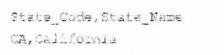
An inner join is configuredbetween the State column of the main input with the State Code column of the lookup table.
What happens when the row containing the name Andrew laylor is processed?
If an output is configured to collect inner join rejects, the data flows to that output as well as the main output.
If an output is not configured to collect inner join rejects, an error condition is raises.
If an output is not configured to collect inner Join rejects, the data flows to the main output.
If an output is configured to collect inner join rejects, the data flows only to that output.
The tMap component allows you to perform data transformations and joins between multiple input sources and output targets. You can configure different types of joins between the main input and the lookup tables, such as inner join, left outer join, right outer join, etc. An inner join returns only the matching rows from both tables based on a join condition. If a row from the main input does not match any row from the lookup table, it is considered as an inner join reject. You can configure an output to collect these rejects by setting the Catch inner join reject option to true. If you do so, the data will flow only to that output and not to the main output. If you do not configure an output to collect the rejects, the data will be ignored and no error will be raised.
References:
Talend Open Studio: Open-source ETL and Free Data Integration | Talend, [tMap properties - 7.3]
You are building a Job to run outsode Talend Studio that must run on both Linux and Windows.
Which action should you take when building the Job?
Select Build Job because Jobs are runnable on all platforms
Specify All for the Shell launcher option in the Build Job windows.
Configure the Job properties building the Job.
Build one package for each platform.
To build a job to run outside Talend Studio that must run on both Linux and Windows, you need to select Build Job because jobs are runnable on all platforms. The Build Job option allows you to export your job as an executable file that can be run independently from Talend Studio on any platform that supports Java.
You can access this option by right-clicking on your job in the Repository tree view and selecting Build Job.
This will open a dialog box where you can configure the build settings, such as destination folder, archive name, context, etc.
You do not need to specify All for the Shell launcher option in the Build Job window, configure the job properties before building the job, or build one package for each platform. These methods are not necessary or available in Talend Studio and may cause errors or unexpected results.
References:
Talend Open Studio: Open-source ETL and Free Data Integration | Talend, [Build Job - 7.3]
Showing 10 of 55 questions · Unlock the full set