UiPath UIPATH-ARDV1 - Questions & Answers
Free preview · every answer includes a full explanation
Product page: https://prepkeys.com/uipath-ardv1.html
A new blank project only has the Main.xaml file and consists of a single Throw activity. The activity is not enclosed in a Try Catch activity.
If this process is published and run from Orchestrator, what is the expected result?
Where in the Robotic Enterprise (RE) Framework template project is the SetTransactionStatus.xaml invoked?
A developer configured the Activity Project Settings for a UI automation and a Click activity in the project shown in the following exhibits:
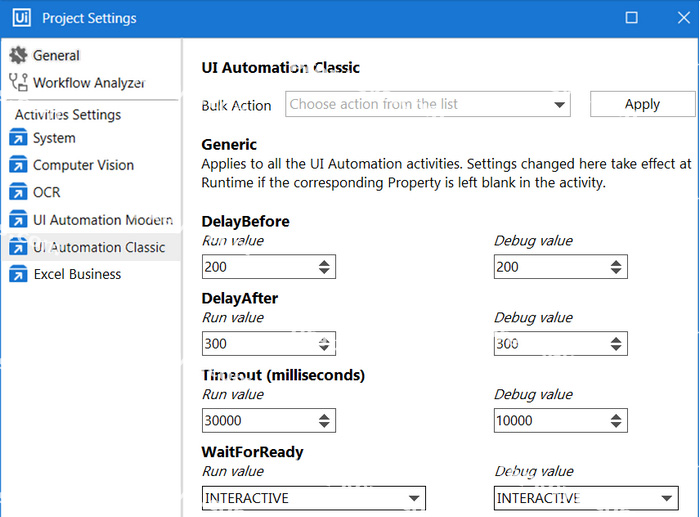
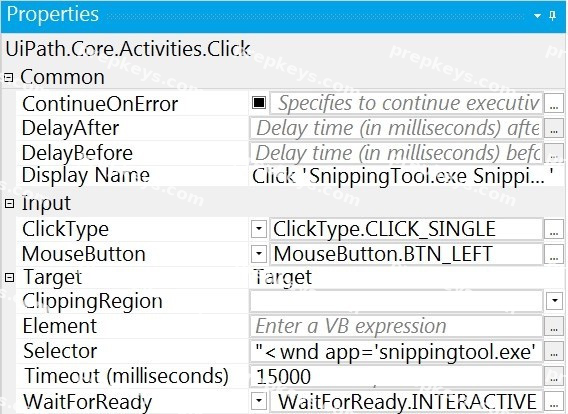
If the target element is not found during execution in Debug mode, how long will it take until an error is thrown?
A developer automates a process which has an Excel file as input data; however, Orchestrator is not
available. As a result, the developer needs to adapt the Robotic Enterprise (RE) Framework for use with tabular data.
Based on UiPath best practices, where should the Excel file be read and stored in a global DataTable variable?
You are developing a .xaml file to interact with multiple fields of a web page. You want to Auto Empty the fields that require input.
Which input method(s) will automatically empty the target input fields?
A developer wants to design a process in which multiple decision points will be used to accommodate complex scenarios.
In UiPath Studio, which recommended type of workflow meets this requirement?
A developer needs to reference the element in the first row of the "ID" column in the System.Data.DataTable, "DT".
Which expression is used to reference this element?
Which file in the Robotic Enterprise (RE) Framework reads the Data/Config.xlsx file and retrieves assets from Orchestrator into the process?
A developer is creating an automation project which processes personal information of employees.
To protect sensitive information that is logged during the execution of the automation at the Verbose level, how can the developer avoid logging variable and argument values in both Orchestrator and Studio?
A developer wants to create an attended automation process. The process will take information from
emails in the current user's inbox.
Assuming the email/domain or password for the user's email inbox are not provided in the automation, which activity can be used to get unread emails with the subject line "Email for Robot"?