UiPath UIPATH-ASAPV1 - Questions & Answers
Free preview · every answer includes a full explanation
Product page: https://prepkeys.com/uipath-asapv1.html
How can a user create a dynamic message in UiPath Apps that contains the user's name when they enter their name in a textbox?
Use the String.Format function in a VB expression for the Text property of the label control.
Use a query to fetch the user's name from the Data Service entity and display it as a greeting.
Add the current date and time along with the user's name using a VB expression
Concatenate "Hello," with the user's name using a double ampersand (&&) symbol.
In UiPath Apps, dynamic messages can be created using expressions. The String.Format function can be used within a VB expression to dynamically insert the user's name into a message displayed on a label control, based on the input from a textbox.
According to the `' process automation visibility criteria'', which tasks are most suitable for automation?
Rule-based and repetitive tasks.
Tasks involving creative problem-solving.
Tasks relying on manual user input.
Tasks requiring consultant human intervention
According to the process automation visibility criteria, the tasks that are most suitable for automation are those that are rule-based and repetitive. Rule-based tasks are those that follow a clear and consistent logic that can be programmed without human judgment. Repetitive tasks are those that are performed frequently and in large volumes, and do not vary much in their execution. These tasks are ideal for automation because they can be easily standardized, optimized, and scaled by software robots, while reducing human errors, costs, and efforts.
References:
Are all processes are suitable for RPA, so how to identify the right processes for Robotic Process Automation Determining What Business Processes To Automate
How To Choose Which Processes To Automate With RPA
A medium-sized insurance company is struggling with the repetitive, time-consuming task of processing insurance claims. The company management is looking for a low-cost innovative solution to streamline and Automate the claims processing workflow to increase efficiency and save time.
Which of the following approaches would you recommend?
Build an RPA solution that extracts insurance claim data, validates the data, and processes the claims automatically, then sends summary to human approver before final submission.
Implement RPA to automatically extract data and validate claims in real time as they are entered by the customers, notifying employees only if discrepancies or manual intervention are required.
Integrate RPA with an AI-powered chatbot capable of intelligently answering claim-related inquiries from customers and processing claims without any human intervention.
Develop an RPA solution that automation only the most time-consuming tasks involved in claims processing, leaving the rest of the process for human intervention.
This approach is recommended because it can reduce the manual effort and errors involved in claims processing, while still maintaining human oversight and control over the final decision. RPA can automate the data extraction, validation, and processing steps, which are often tedious and time-consuming, and improve the accuracy and speed of claims handling. By sending a summary to a human approver before final submission, the company can ensure compliance and quality standards, and also handle any exceptions or complex cases that may require human judgment
References:
How RPA Improves Insurance Claims Processing Efficiency | UiPath Aspire Systems
What are the permissions required for a document validation user?
View and edit on Actions, View, edit, and create on Storage files. View on Storage Bucket View and edit on Action Assignments.
View on Actions, view, on storage files, view on Storage Buckets View and edit on Action Assignments.
View on Action, View and edit on Storage Files. View and create on Storage Buckets View and edit on Action Assignments.
View and edit Actions. View, edit, and create on Storage Files. View on Storage Buckets View on Action Assignments.
A document validation user is a user who can see and validate the form and document validation actions assigned to them in the My Actions view of UiPath Action Center. To perform this role, the user needs the following permissions in UiPath Orchestrator: View and edit on Actions: This allows the user to access and complete the actions assigned to them.
View, edit, and create on Storage files: This allows the user to upload, download, and modify the files associated with the actions, such as the document images and the extraction results.
View on Storage Buckets: This allows the user to view the storage buckets where the files are stored.
View and edit on Action Assignments: This allows the user to view and change the assignment status of the actions, such as claiming, releasing, or reassigning them.
References:
Action Center - Roles and Permissions - UiPath Documentation Portal Create Document Validation Action - UiPath Documentation Portal Create Document Validation Action: You are not authorized - Action Center - UiPath Community Forum
What are the two main delivery options for the UiPath Platform?
UiPath Automaton Studio and UiPath Automation Hub
UiPath Automaton Web and UiPath Automaton Desktop
UiPath Automaton Cloud and UiPath Automaton Suite
UiPath Automaton Enterprise and UiPath Automaton Express
UiPath offers two main delivery options for the UiPath Platform, which are designed to provide customers with flexibility and choice on how to deploy and manage their automation solutions. These options are: UiPath Automation Cloud: This is a cloud-based service that provides the complete UiPath Platform as a software as a service (SaaS) offering. Customers can access all the UiPath products and services from a single web portal, without having to worry about infrastructure, maintenance, or updates. UiPath
Automation Cloud is scalable, secure, and compliant with various standards and regulations. UiPath Automation Suite: This is a self-hosted solution that delivers the same cloud-native platform architecture and functionality as UiPath Automation Cloud, but on-premises or in a public cloud of the customer's choice. Customers can install and configure UiPath Automation Suite on Linux-based hardware or virtual machines, and benefit from the containerized and microservices-based design, the unified user experience, and the platform services. UiPath Automation Suite also includes tools for managing and monitoring the Kubernetes and Linux infrastructure, as well as periodic updates for the entire package.
References:
Overview - Product Differences - UiPath, Delivering Cloud Native Infrastructure On-Premises |
UiPath, Overview - Platform Guidelines for Partners - UiPath.
What is the recommended course of action when dealing with the choice of using a template for the Solution Design Document (SOD)?
Utilize any template available without considering customer preference
Always use the default UiPath S00 Template without exceptions
Never use any templates to ensure flexibility in documentation
Use the customer's template if it is requested by their CoE
The Solution Design Document (SDD) is a document that describes the technical design and implementation details of an automation solution. It is based on the Process Design Document (PDD) that defines the business requirements and process flow. The SDD should follow a standard template that ensures consistency and quality across different automation projects. However, some customers may have their own template or preferences for the SDD, especially if they have a Center of Excellence (CoE) that oversees the automation governance and best practices. In such cases, the UiPath Automation Solution Architect should use the customer's template or adapt the default UiPath SDD template to meet the customer's expectations and standards.
References:
Become an Automation Solution Architect | UiPath Academy
Roles of a Solution Architect in Automation, RPA Setting - UiPath Template of PDD and SDD - UiPath Community Forum
What are two key best practices for UiPath license estimation?
Assess the number and complexity of processes and identify required robot types (such as Attended or Unattended).
Calculate the ROI of automating a certain process and assess the volume of emails processed by the automations.
Analyze business metrics and identify the number of applications automated by the processes.
Assess concurrent robot usage during peak workload and optimize the chain of approvals in the decision-making.
For UiPath license estimation, two key best practices include assessing the number and complexity of processes to determine the required types of robots (e.g., Attended, Unattended, Studio, StudioX) and evaluating concurrent robot usage during peak workloads. Understanding the complexity of the processes helps in choosing the right type of robots that align with the tasks' needs, ensuring efficient automation.
Concurrent usage assessment is crucial for optimizing resource allocation, especially during peak periods, to maintain high efficiency and productivity without overprovisioning resources. This strategic approach to licensing can significantly enhance the scalability and cost-effectiveness of RPA initiatives.
References:
UiPath Licensing Guide: Robot Types and Licensing UiPath Best Practices: License Management
Consider the following high-level solution diagram:
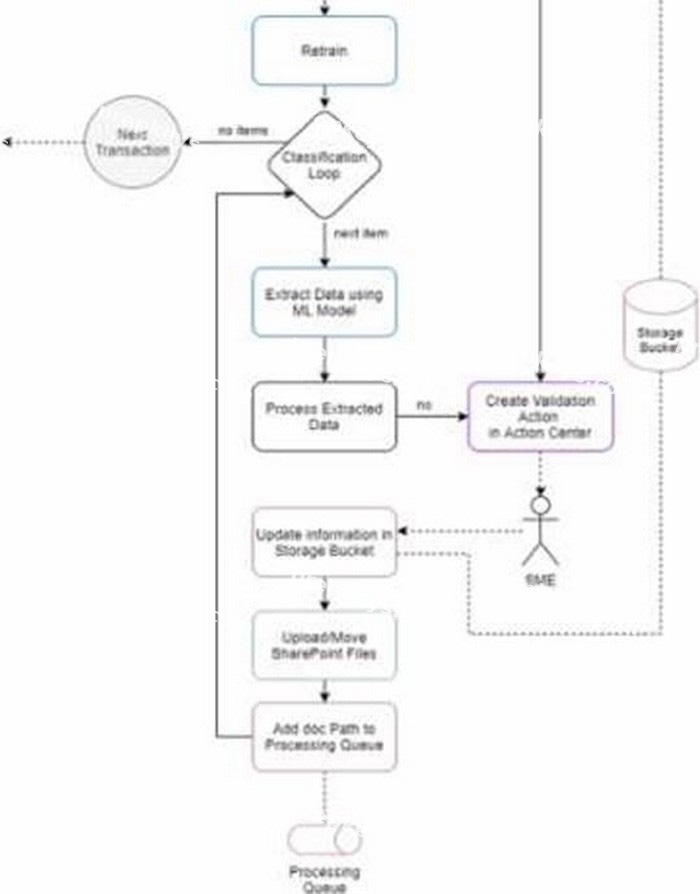
What activity should be used for implementing me Classification Loop according to UiPath Best Practices?
Which activity
Do While activity
For Each activity
Parallel For Each activity
According to UiPath Best Practices, the For Each activity should be used for implementing the Classification Loop in the high-level solution diagram. The For Each activity enables you to iterate through a collection of items and perform an action for each item. In this case, the collection of items would be the invoices from various clients that require processing. The action for each item would be to extract data using the ML model, process the extracted data, update the information in the storage bucket, upload or move the SharePoint files, and add the document path to the processing queue. Alternatively, if the extracted data is not processed, the action would be to create a validation in the Action Center and wait for the SME to review it. The For Each activity is suitable for this scenario because it allows you to process each invoice sequentially and handle any exceptions or validations that may occur. The For Each activity also has a Body property where you can add other activities or invoke workflows that are relevant to the Classification Loop logic.
References:
For Each - UiPath Activities, Design Best Practices - UiPath Documentation Portal, Automation Solution Architect - UiPath Academy
In the license estimation process, what might indicate the need for additional licenses during the process design stage?
Number of Data Service entities used.
High runtime, high volume, and low SLA.
Number of UiPath Studio project created
Low runtime, low volume, and medium-high SLA
This answer is correct because high runtime, high volume, and low SLA indicate that the automation process is complex, frequent, and critical, which requires more resources and licenses to execute and manage. For example, more unattended robots may be needed to run the process without human intervention, more Orchestrator tenants may be needed to isolate and scale the process across different environments, and more Studio licenses may be needed to design and test the process.
References:
Automation Pricing - Complete UiPath Enterprise Solution | UiPath
UiPath Pricing 2024: Its 3 RPA Pricing Models, Clearly Explained
What is the responsibility of the user when deploying UiPath products using Standalone or Automation Suite deployment models?
Hosting, configuring, and maintaining the file servers.
Maintaining and scaling the infrastructures and upgrading to newer versions.
Provisioning scaling, and maintenance of the infrastructure of Kubernetes
Configuring the integration between UiPath products as it's not built-in
When deploying UiPath products using Standalone or Automation Suite deployment models, the user is responsible for maintaining and scaling the infrastructures and upgrading to newer versions. This means that the user has to provide the hardware and software resources required for the installation and operation of the UiPath products, as well as monitor and optimize their performance and availability. The user also has to ensure that the UiPath products are updated to the latest versions and patches, and that the compatibility and dependencies between them are maintained. (
https://docs.uipath.com/installation-and-upgrade/docs/standalone-deployment)
References:
UiPath Installation and Upgrade - Standalone Deployment UiPath Installation and Upgrade - Automation Suite Deployment UiPath Academy - RPA Solution Architecture Fundamentals UiPath Certified Professional Automation Solution Architect
Showing 10 of 150 questions · Unlock the full set