Exit 9L0-420 Mac Integration Basics 10.10 Exam
Question 5 of 5
0% complete
Q5 Single choice

Review the screenshot, then answer the question below.
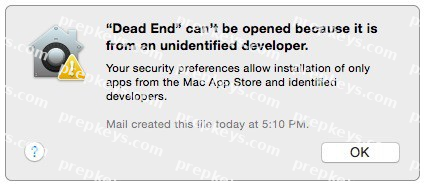
You try to open an application called Dead End, but you get the alert shown above. You know the application comes from a trusted source.

How can you open the Dead End application?

  • A

    Open Security & Privacy preferences, click the Gatekeeper tab, click the Add (+) button beneath the Authorized Applications list, and enter Dead End.

  • B

    Control-click the application, choose Open from the shortcut menu, then click Open in the dialog that appears.

  • C

    Option-click the application.

  • D

    Open Security & Privacy preferences, click the Gatekeeper tab, click the Add (+) button beneath the Developers list, and enter Houdini.