Exit C9060-511 IBM Tivoli Storage Manager V7.1 Implementation
Question 1 of 5
0% complete
Q1 Single choice

The IBM Tivoli Storage Manager (TSM) Backup-Archive client has been installed on a Windows system having a working network connection with hostname WIN2K8-SRV1 and IP address 172.18.35.47. The TSM server is running and is located at IP address 172.18.35.100. No firewalls are in place and all other server and client communications parameters are left to their default values. When opening the TSM Backup-Archive client command line the result is:
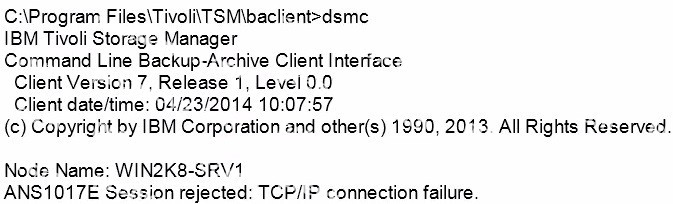
Which two steps are taken to avoid this error and successfully connect to the TSM server?

  • A

    Run the dsmc command again, but add the -TCPSERVERADDRESS=172.18.35.100 option.

  • B

    Use the Backup-Archive client GUI's Preferences editor to update the server port value: and try connecting again.

  • C

    Update the node's dsm.opt file to include the option TCPSERVERADDRESS 172.18.35.100, and try connecting again.

  • D

    Update the node's dsm.sys file to contain the option TCPSERVERADDRESS 172.18.35.100; and try
    connecting again.

  • E

    Use the Backup-Archive client GUI's Preferences editor to confirm the options file contains a valid node name, and try connecting again.

Previous Next