Exit 72300X Avaya Aura Communication Applications Support
Question 5 of 5
0% complete
Q5 Single choice

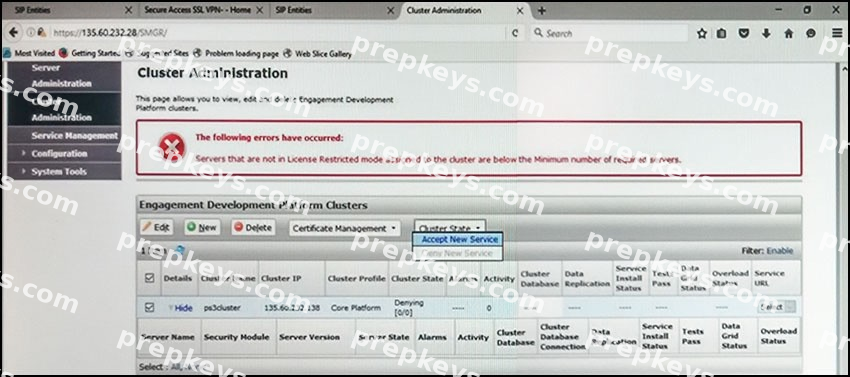
Refer to the exhibit.

In the Cluster Administration screen of a PresenceServices cluster, when you try to change the cluster state to Accept New Service, you receive the error:

Servers that are not in License Restricted mode assigned to the cluster are below the Minimum number of required servers.

You check that a server has been administered under Engagement Development Platform > Server
Administration which shows green check under License Mode, and a System State of Denying.

Which action needs to be taken to solve this problem?

  • A

    Edit the Cluster, access the Servers tab, and assign the server to the cluster; then set the cluster to
    Accept New Service.

  • B

    Under Engagement Development Platform > Server Administration, select the server and change the
    System State to Accept New Service, then return to the Cluster Administration screen and set the cluster to Accept New Service.

  • C

    Obtain and install an Avaya BreezeTM license on webLM with more instances of Avaya BreezeTM nodes.

  • D

    Edit the cluster to change the cluster profile from Core Platform to General Purpose.